liveBook · Manning

Developer productivity

As explained in Lead Developer Career Guide

The amount of useful work or output produced relative to the resources or time consumed.

Developer productivity means making useful progress efficiently. Focused time supports learning, while AI coding tools can speed up development; both approaches have limits to manage. section 3.1.4 section 6.1.3

Practical ways to protect productive time and use coding assistance thoughtfully:

  • Block study time, silence notifications, and focus on one task for 15–30 minutes. If urgent work competes with study, clarify what should be deprioritized or delegate where appropriate. section 3.1.4
  • Use AI tools for repetitive code and suggestions, but review their output: it may be incorrect, insecure, or encourage dependence. section 6.1.3
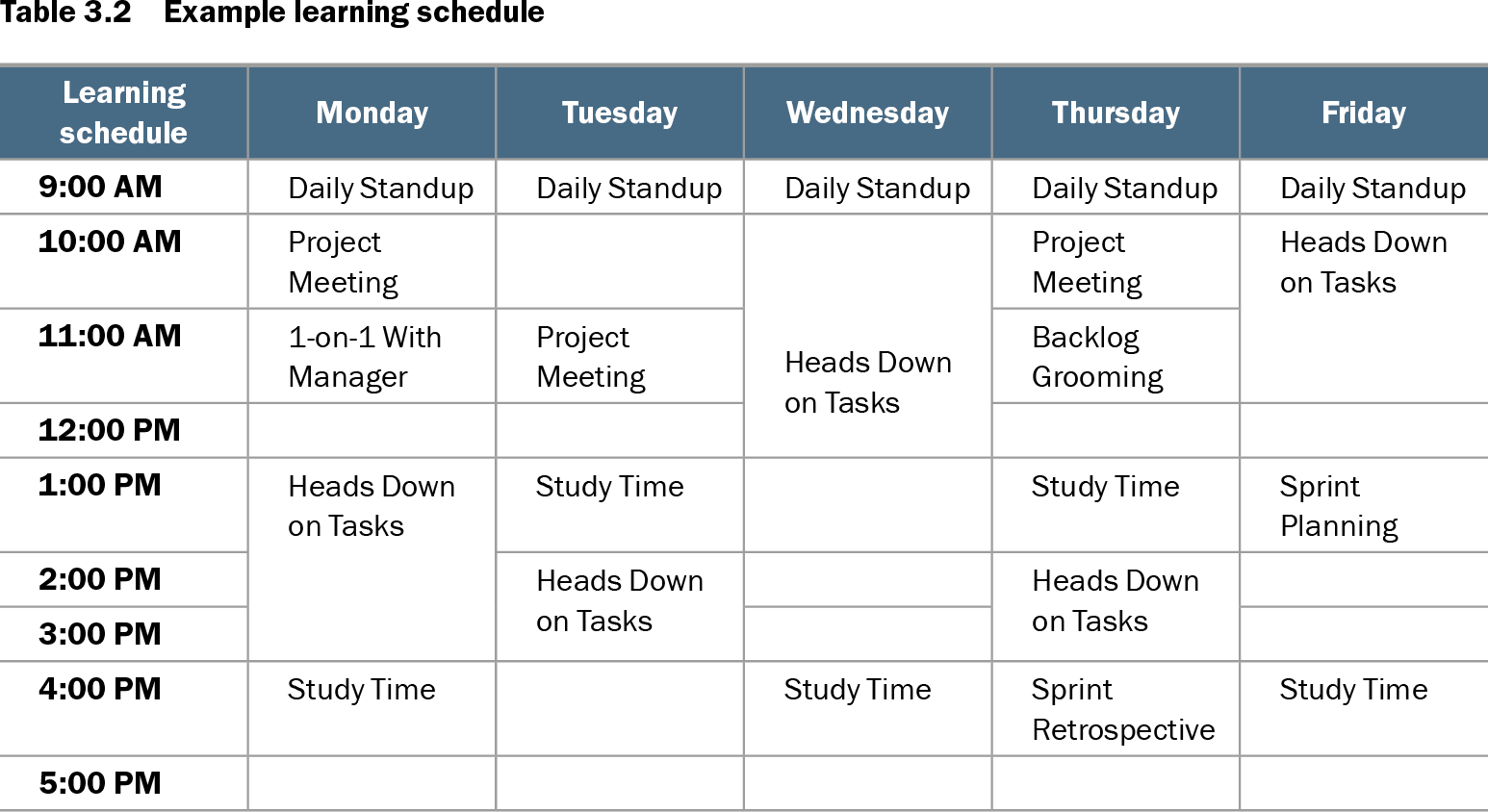
Table 3.2 Example learning schedule (view table figure)

Learning schedule

Monday

Tuesday

Wednesday

Thursday

Friday

9:00 AM

Daily Standup

Daily Standup

Daily Standup

Daily Standup

Daily Standup

10:00 AM

Project Meeting

Heads Down on Tasks

Project Meeting

Heads Down on Tasks

11:00 AM

1-on-1 With Manager

Project Meeting

Backlog Grooming

12:00 PM

1:00 PM

Heads Down on Tasks

Study Time

Study Time

Sprint Planning

2:00 PM

Heads Down on Tasks

Heads Down on Tasks

3:00 PM

4:00 PM

Study Time

Study Time

Sprint Retrospective

Study Time

5:00 PM

A sample weekly calendar shows how study sessions can fit around meetings and focused work. section 3.1.4

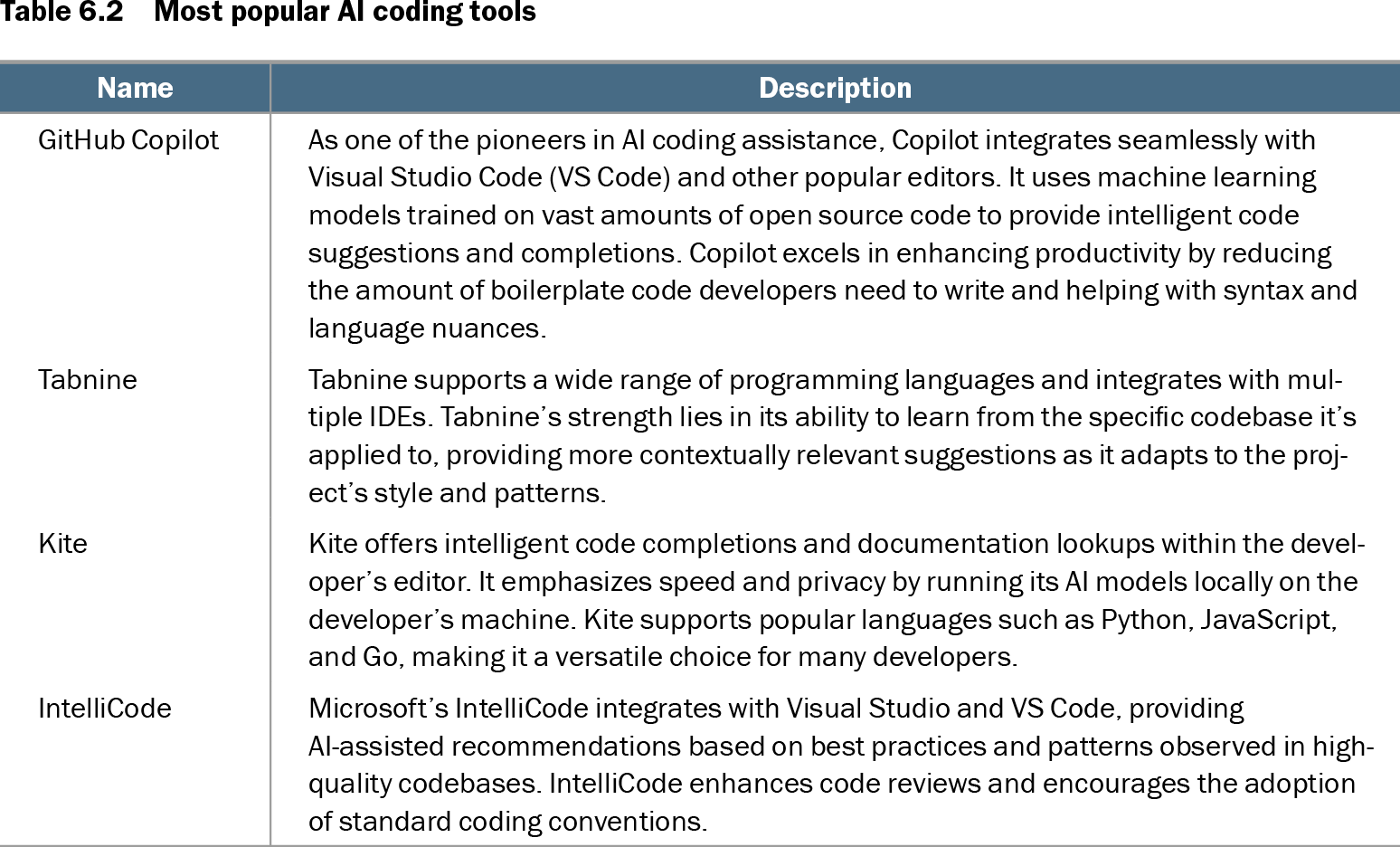
Table 6.2 Most popular AI coding tools (view table figure)

Name

Description

GitHub Copilot

As one of the pioneers in AI coding assistance, Copilot integrates seamlessly with Visual Studio Code (VS Code) and other popular editors. It uses machine learning models trained on vast amounts of open source code to provide intelligent code suggestions and completions. Copilot excels in enhancing productivity by reducing the amount of boilerplate code developers need to write and helping with syntax and language nuances.

Tabnine

Tabnine supports a wide range of programming languages and integrates with multiple IDEs. Tabnine’s strength lies in its ability to learn from the specific codebase it’s applied to, providing more contextually relevant suggestions as it adapts to the project’s style and patterns.

Kite

Kite offers intelligent code completions and documentation lookups within the developer’s editor. It emphasizes speed and privacy by running its AI models locally on the developer’s machine. Kite supports popular languages such as Python, JavaScript, and Go, making it a versatile choice for many developers.

IntelliCode

Microsoft’s IntelliCode integrates with Visual Studio and VS Code, providing AI-assisted recommendations based on best practices and patterns observed in high-quality codebases. IntelliCode enhances code reviews and encourages the adoption of standard coding conventions.

Compare coding assistants and the ways they support code completion and productivity. section 6.1.3


How Lead Developer Career Guide covers it

How deep it goes
Gives focus and scheduling tactics, then weighs AI coding benefits against dependence, security, and correctness risks.
Examples
Uses a weekly learning calendar, short study sessions, notification-free focus, and AI-generated code suggestions.
What you can do after
Apply productivity tactics by scheduling study, limiting interruptions, and reviewing AI suggestions for quality and security.
How it connects
Connects productivity with time management, focused work, professional learning, and AI coding tools.

Also explained in

Compare how 4 books explain developer productivity →

Related concepts

This explainer was generated by Manning's knowledge graph from the text of Lead Developer Career Guide. The section links point to the parts of the book it draws on.