A Dockerfile is a text-based build specification for creating a Docker image. It captures the runtime base, working directory, application files, dependencies, exposed port, and startup command so an application can run in an isolated container. section 7.0 section 7.1
A practical Dockerfile workflow combines guided generation with review and local testing:
- Prompt an infrastructure-aware coding assistant with the application entry point, Python version, dependency file, and required port. section 7.1
- Review instructions such as FROM, WORKDIR, COPY, RUN, EXPOSE, and CMD rather than treating generated output as automatically correct. section 7.1
- Build the image locally with docker build, then run a named container with docker run and verify the application’s port mapping. section 7.1
Python application Dockerfile
FROM python:3.10-slim-buster WORKDIR /app COPY . /app RUN pip install --trusted-host pypi.python.org -r requirements.txt EXPOSE 8080 CMD ["python", "main.py"] Build it with `docker build -t itam:latest .`, then check that the `docker run` port mapping matches the application’s exposed port before testing the container. section 7.1
Figure 7.1 Docker makes use of the host’s operating system while isolating each of the containers. This makes Docker containers lightweight compared to virtual machines, as they do not require a full OS to run.
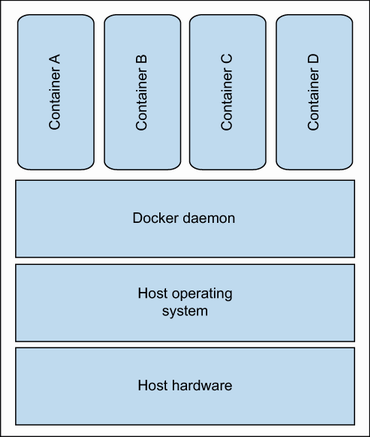
Visualizes how Docker shares the host operating system’s kernel while isolating application processes and filesystems, making containers lighter than full virtual machines. section 7.1

















