A Dockerfile, also called a Containerfile, is a declarative text file whose directives automate construction of a container image and describe its default runtime behavior. Podman defaults to Containerfile but accepts Dockerfile with the same syntax. section 2.3 section 2.3.1
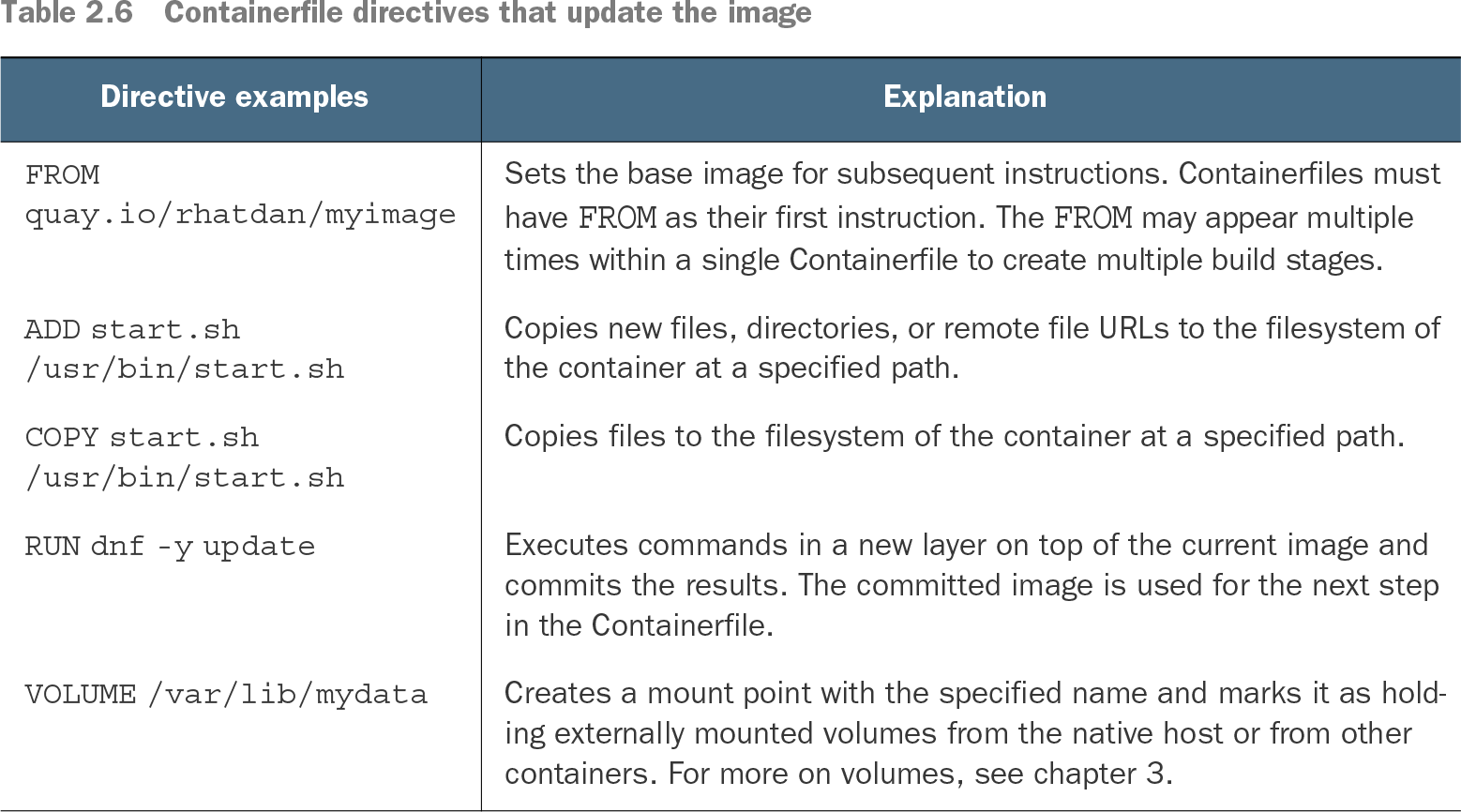
Building starts from a base image named by FROM, or from scratch for an empty rootfs. COPY and ADD populate the rootfs, while RUN executes build-time commands in a container and commits each result as the next image layer. Build commands use the same security constraints as container execution. section 2.3.1
Runtime-oriented directives define how the resulting image is used:
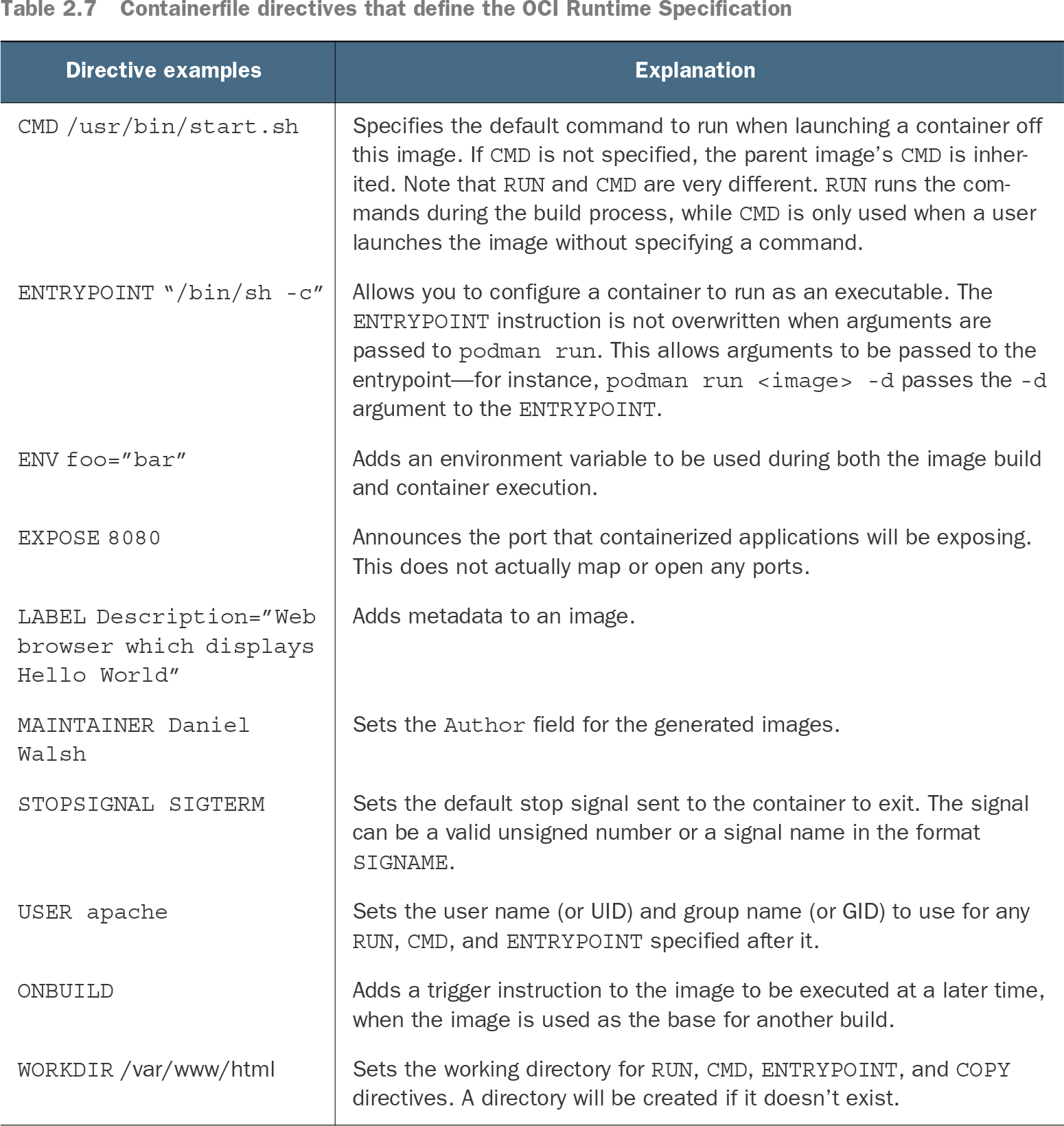
- CMD supplies the default command when a container starts without an explicit command. section 2.3.1
- ENTRYPOINT configures the image as an executable and remains in place when podman run supplies arguments. section 2.3.1
- ENV provides variables during both image construction and container execution; EXPOSE documents a container port. section 2.3.1
Build a small HTTP application image
Place index.html and a Containerfile in a context directory, then build with: podman build -t quay.io/rhatdan/myimage ./myapp. A minimal file can use FROM ubi8/httpd-24 followed by COPY index.html /var/www/html/index.html. The resulting image can be pushed to a container registry. section 2.3.2
Table 2.6 Containerfile directives that update the image (view table figure)
| Directive examples |
Explanation |
| FROM quay.io/rhatdan/myimage
|
Sets the base image for subsequent instructions. Containerfiles must have FROM as their first instruction. The FROM may appear multiple times within a single Containerfile to create multiple build stages. |
| ADD start.sh /usr/bin/start.sh
|
Copies new files, directories, or remote file URLs to the filesystem of the container at a specified path. |
| COPY start.sh /usr/bin/start.sh
|
Copies files to the filesystem of the container at a specified path. |
| RUN dnf -y update
|
Executes commands in a new layer on top of the current image and commits the results. The committed image is used for the next step in the Containerfile. |
| VOLUME /var/lib/mydata
|
Creates a mount point with the specified name and marks it as holding externally mounted volumes from the native host or from other containers. For more on volumes, see chapter 3. |
Use the directive table to compare image-building instructions and their effects on the resulting filesystem. section 2.3.1
Table 2.7 Containerfile directives that define the OCI Runtime Specification (view table figure)
| Directive examples |
Explanation |
| CMD /usr/bin/start.sh
|
Specifies the default command to run when launching a container off this image. If CMD is not specified, the parent image’s CMD is inherited. Note that RUN and CMD are very different. RUN runs the commands during the build process, while CMD is only used when a user launches the image without specifying a command. |
| ENTRYPOINT “/bin/sh -c”
|
Allows you to configure a container to run as an executable. The ENTRYPOINT instruction is not overwritten when arguments are passed to podman run. This allows arguments to be passed to the entrypoint—for instance, podman run <image> -d passes the -d argument to the ENTRYPOINT. |
| ENV foo=”bar”
|
Adds an environment variable to be used during both the image build and container execution. |
| EXPOSE 8080
|
Announces the port that containerized applications will be exposing. This does not actually map or open any ports. |
| LABEL Description=”Web browser which displays Hello World”
|
Adds metadata to an image. |
| MAINTAINER Daniel Walsh
|
Sets the Author field for the generated images. |
| STOPSIGNAL SIGTERM
|
Sets the default stop signal sent to the container to exit. The signal can be a valid unsigned number or a signal name in the format SIGNAME. |
| USER apache
|
Sets the user name (or UID) and group name (or GID) to use for any RUN, CMD, and ENTRYPOINT specified after it. |
| ONBUILD
|
Adds a trigger instruction to the image to be executed at a later time, when the image is used as the base for another build. |
| WORKDIR /var/www/html
|
Sets the working directory for RUN, CMD, ENTRYPOINT, and COPY directives. A directory will be created if it doesn’t exist. |
Use the runtime table to distinguish build-time RUN behavior from CMD, ENTRYPOINT, ENV, and other launch metadata. section 2.3.1