A Dockerfile is a text configuration file that defines how to build a container image. It starts from a base image, adds application files and dependencies, and declares the command the container runs. For a Python API, this separates image setup from docker-compose.yml, which can then build and run the service. section 3.2.3 section 4.4.2
A practical Dockerfile commonly builds an application in this order:
- Choose a base image with FROM. A tag can lock a version; using latest is suitable here for development but needs more care in production because versions can introduce deprecated features, bugs, or vulnerabilities. section 3.2.3
- Set a working directory, then copy dependency manifests before application code so package installation has the files it needs. section 4.4.2
- Run installation commands during the image build, such as operating-system package installation and pip or npm dependency installation. section 4.4.2 section 6.8
- Copy the application source and set CMD to the default startup command, such as Uvicorn for FastAPI or npm start for a dashboard. section 3.2.3 section 6.8
Python API image
A FastAPI image can use python:alpine, work in /code, copy requirements.txt, install system and Python dependencies, copy ./app, and start Uvicorn on port 8000. docker-compose.yml points its build context at the API folder and maps port 8000. section 4.4.2
Instruction order affects both image layers and build time. Docker caches build steps, so stable and expensive work belongs near the top, while frequently changed application code belongs near the bottom. Reversing that pattern can bust the cache and rebuild more than necessary. Keep layers minimal, clean temporary files in the same layer, and use .dockerignore to avoid sending unnecessary files into the build context. section 3.6.3
Figure 3.4 Analysis with Docker Scout
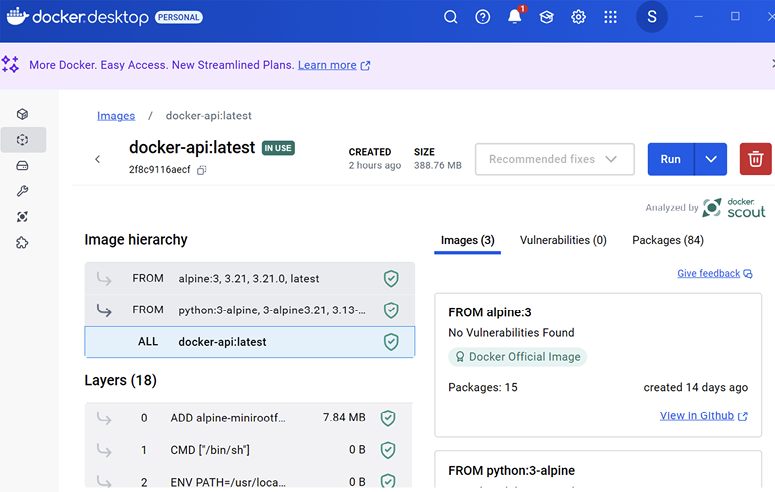
Inspect the image’s layers, commands, sizes, and filesystem effects to identify build-time and image-size improvements. section 3.6.3
A Dockerfile can also receive build-time values. A dashboard image uses ARG to accept NEXT_PUBLIC_API_URL, ENV to set it inside the image, then builds and starts the application. Because this URL is used by browser-side code, it uses localhost:8081 rather than the internal WireMock container address. section 6.8
When a container fails to start or connect, inspect the Dockerfile alongside requirements.txt and docker-compose.yml. Missing dependencies can stop the API; incorrect database credentials can cause authentication failures. Container-to-container connections should use the container name or address rather than localhost. section 3.3.2

















