Autoscaling adjusts workflow capacity as demand changes, allowing independently deployable services to absorb bursts without requiring developers to manage orchestration directly. The Workflow Service monitors health and metrics, manages container lifecycles, and scales workflow replicas behind the API Gateway. section 2.6
A production autoscaling configuration combines:
- A replica floor that keeps capacity available and avoids cold starts. section 10.12
- A replica ceiling that bounds infrastructure cost. section 10.12
- A resource target that leaves headroom for bursts; a 70% CPU target is used for Claw. section 10.12
- Stateless workflow containers, with sessions, memory, knowledge bases, and credentials stored in platform services so replicas can scale horizontally. section 10.12
Claw deployment
Deploying Claw creates a Kubernetes deployment with resource limits, registers its API route, and configures two to ten replicas at a 70% CPU target. Research child workflows scale independently, preventing parallel research bursts from starving the conversational workflow. section 10.12
Figure 10.11 The complete deployment architecture. The Workflow Service (control plane) packages the code, deploys containers, registers routes, and manages scaling. The containers (data plane) handle user requests.
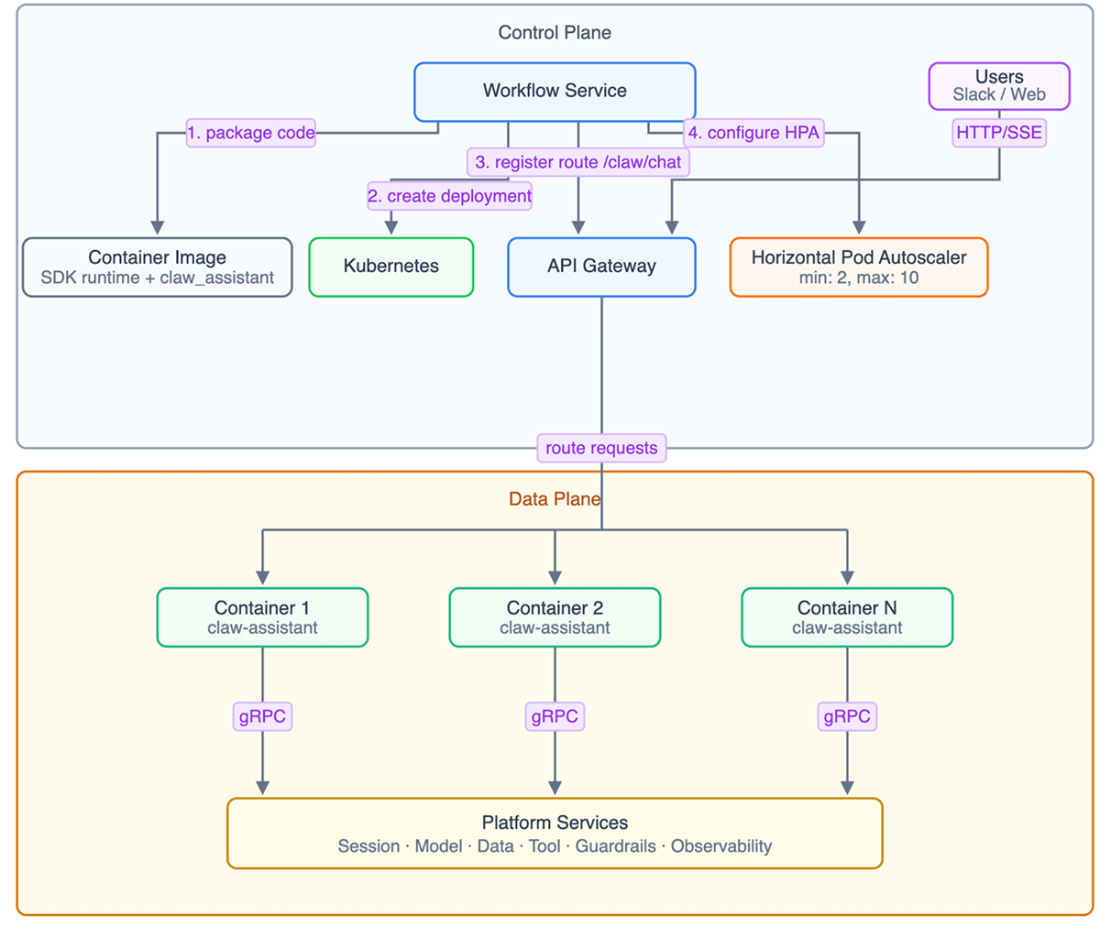
The deployment architecture separates the control plane, which packages code and manages scaling, from the data plane, which serves requests through workflow containers. section 10.12