A downstream task follows another task in an Airflow dependency structure. Airflow can execute it after its upstream task succeeds, select it through branching, or skip it when a condition fails. section 6.2.2 section 6.3.2
Use downstream relationships to control workflow execution:
- Connect a branch task to multiple downstream tasks; a callable returns one task ID or a list of IDs to select the branch. section 6.2.2
- Connect both branch paths to a later task, then use an appropriate trigger rule so a skipped alternative does not prevent continuation. section 6.2.2
- Place a condition task upstream of deployment and raise AirflowSkipException when the condition fails; Airflow then skips the downstream deployment task. section 6.3.2
Choosing an ERP path
A DAG can place pick_erp_system upstream of fetch_sales_old and fetch_sales_new. The branch callable returns fetch_sales_old before the ERP change date and fetch_sales_new afterward. Both cleaning tasks can feed join_branch, an EmptyOperator configured with trigger_rule="none_failed", before join_datasets continues the workflow. section 6.2.2
Figure 6.7 Supporting two ERP systems using branching within the DAG, implementing different sets of tasks for both systems. Airflow can choose between these two branches using a specific branching task (here, “Pick ERP system”), which tells Airflow which set of downstream tasks to execute.
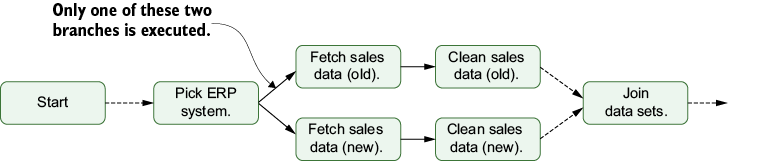
Visualizes two ERP-specific task branches and the branching task that chooses which downstream set executes. section 6.2.2


