A dynamic interface is a logical wireless LAN controller interface that connects a WLAN to a wired VLAN. It operates similarly to a switch SVI: traffic from the WLAN exits the controller tagged for the associated VLAN. section 21.2 section 21.2.1
Configure each dynamic interface with the network details required to connect its WLAN to the wired network:
- Associate the interface with a VLAN ID and use consistent interface, VLAN, and WLAN names where practical. section 21.2.2
- Specify the interface IP address, netmask, and gateway used to reach external destinations. section 21.2.2
- Specify the DHCP server to which the controller forwards client DHCP messages. section 21.2.2
- Create the dynamic interface before creating its WLAN, then select the correct interface when configuring and enabling that WLAN. section 21.3 section 21.4
Internal and Guest WLANs
Create an Internal dynamic interface on VLAN 100, configure its IP address and netmask, and use SW1’s VLAN 100 SVI at 10.0.0.1 as both the default gateway and DHCP server. Repeat the process for the Guest WLAN, then select each corresponding dynamic interface when creating and enabling its WLAN. section 21.2.2 section 21.3
Figure 21.9 WLC ports and interfaces. Ports are physical connectors that connect to other devices, and interfaces are logical entities in the WLC.
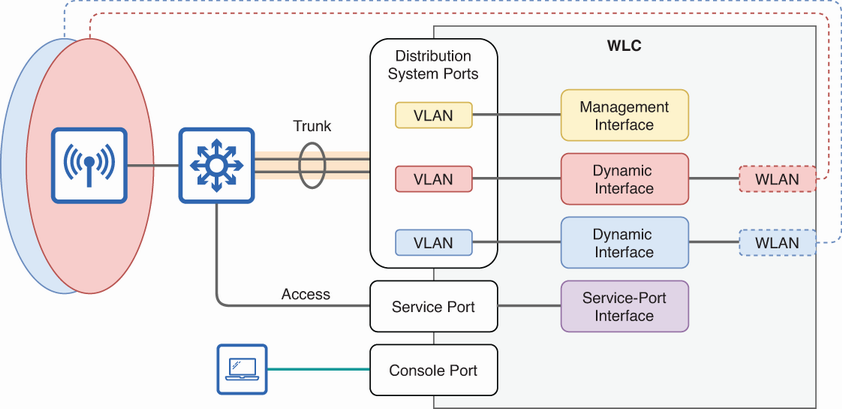
Use the interface diagram to distinguish physical WLC ports from logical interfaces such as dynamic, management, service-port, and virtual interfaces. section 21.2.1
