In a fraud investigation, separate transaction rows may conceal that several customers use the same device. A graph makes that relationship visible: entities such as customers, accounts, devices, and IP addresses become nodes; an edge records a connection or interaction between two nodes. Investigators can then ask who is connected to whom, rather than assessing each event alone. section 9.2.1 section 9.1
Define what an edge means before building the graph:
- A transaction can connect a user to a merchant; ownership can connect a user to an account; a transfer can connect two accounts. section 9.2.1
- A shared identifier can link users who used the same device or IP address. An edge can also carry properties, such as transaction amount, timestamp, or a count of shared-IP use. section 9.2.1
- For a graph built from transaction records, connect entities that appear in the same transaction. An edge weight can count how many transactions linked a pair. section 9.3.2
Listing 9.2 Building the graph from transaction data with parallel edge preparation
if transactions_df is not None:
    G = nx.Graph()            #1

    node_types_and_columns = {
        'user': 'user_id', 'ip': 'ip', 'device': 'device_id',
        'phone': 'phone_number', 'card': 'credit_card_number'
    }

    print("Preparing nodes for the graph...")
    for node_type, col_name in node_types_and_columns.items():
        for entity_id in transactions_df[col_name].unique():
            G.add_node(f"{node_type}_{entity_id}", type=node_type)
    print(f"Initial nodes added. Total nodes: {G.number_of_nodes()}")

    edges_to_add_with_attributes = defaultdict(lambda: {'weight': 0, 'transactions': []})

    def process_transaction_row(index_row_tuple):
        index, row = index_row_tuple
        transaction_entities_in_row = []
        for node_type_key, col_name_val in node_types_and_columns.items():
            transaction_entities_in_row.append(f"{node_type_key}_{row[col_name_val]}")
        row_edges = []
        for node1, node2 in combinations(sorted(transaction_entities_in_row), 2):
            row_edges.append(((node1, node2), row['transaction_id']))
        return row_edges

    print("\nProcessing transactions in parallel to prepare edge data...")

    prepared_edges_nested_list = []
    with ThreadPoolExecutor(max_workers=8) as executor: # Using 8 worker threads
        futures = [executor.submit(process_transaction_row, item) for item in transactions_df.iterrows()]
        count = 0
        for future in as_completed(futures):
            prepared_edges_nested_list.extend(future.result())
            count += 1
            if count % 1000 == 0 and count > 0: # Print progress every 1000 transactions
                print(f"Processed {count} transactions for edge preparation...")

    print(f"All {len(transactions_df)} transactions processed for edge preparation.")

    print("\nAggregating edge data and adding edges to the graph...")
    for (node1, node2), transaction_id in prepared_edges_nested_list:
        edges_to_add_with_attributes[(node1, node2)]['weight'] += 1
        edges_to_add_with_attributes[(node1, node2)]['transactions'].append(transaction_id)

    for (node1, node2), attributes in edges_to_add_with_attributes.items():
        G.add_edge(node1, node2, weight=attributes['weight'], transactions=attributes['transactions'])

    print("\nGraph construction completed.")
    print(f"Number of nodes in the graph: {G.number_of_nodes()}")
    print(f"Number of edges in the graph: {G.number_of_edges()}")
else:
    print("transactions_df not loaded. Skipping graph construction.")
    G = None
The NetworkX listing starts with typed nodes for users, IPs, devices, phones, and cards, then prepares edges from transaction co-occurrences in parallel. Check the resulting node and edge counts before applying community detection. section 9.3.2
Figure 7.5 A conceptual visualization of transactions involving users who filed chargebacks. This simplified graph highlights the ability to quickly identify commonly shared merchants among users. The numbers on the edges represent the transaction dates (YY.MM.DD format). The solid lines indicate normal transactions, while the dashed lines represent transactions that were later disputed as chargebacks. While this example remains intentionally minimal, such graph-based relationships become even more valuable in complex real-world scenarios where detecting shared connections can reveal fraud rings or coordinated behavior.
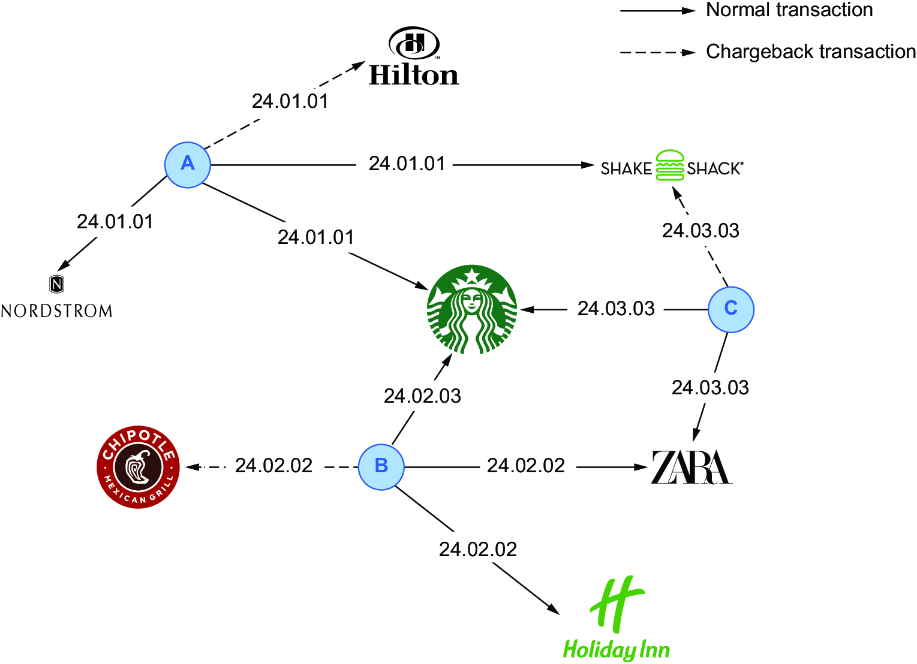
The chargeback diagram distinguishes ordinary transactions from later-disputed ones with line styles and marks transaction dates on the edges. Shared merchants become easier to spot. section 7.4.1
Edge design affects what an investigation can find. Multi-hop links can expose apparently unrelated applicants connected through a device, while densely connected groups can point analysts toward coordinated activity. Choose directed, undirected, weighted, or heterogeneous relationships according to the fraud pattern; treat a suspicious connection as an investigative signal, not a verdict on its own. section 9.1 section 9.6

















