An edge is a directed connection between LangGraph nodes. It determines where execution moves next and carries the workflow’s state from one processing step to another. A simple edge creates a fixed transition; a conditional edge selects a destination from the runtime state. section 5.2 section 5.4
Figure 5.3 LangGraph core components. A strongly typed state (in this example, modeled with ResearchState) flows through the workflow. Nodes, usually Python functions (e.g., def select_assistant), perform tasks, and edges create directed data flows between nodes, in some cases, with conditional paths.
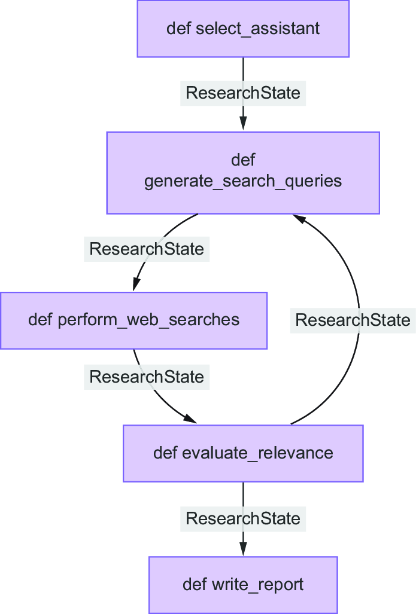
Use the graph view to trace how typed state moves through processing nodes and how edges create fixed or conditional paths. section 5.4
Build edge behavior incrementally:
- Connect two named nodes for a fixed execution order, such as generate_queries to perform_searches. section 5.4.3
- Route dynamically with a decision function that reads state and returns the next node, such as refine_queries or summarize_results. section 5.4.3
- Define where execution starts and ends separately; an entry point begins the graph, while an edge to END terminates it. section 5.4.4
- Use conditional edges for loops as well as branches, allowing insufficient search results to trigger another search before synthesis. section 5.6
Research workflow
A research assistant can connect perform_searches to a decision function. If the state contains fewer than two search results, the edge routes to refine_queries; otherwise, it routes to summarize_results. The graph therefore adapts to intermediate results instead of following one fixed chain. section 5.4.3 section 5.5.4
Explicit edges make execution order and data flow easier to trace, test, and debug. They also isolate error handling by node and make later workflow extensions less disruptive. In tool-based agents, conditional edges can move between an LLM node and a tool executor, then loop back for another decision. section 5.5.4 section 11.3

















