An event handler is a callback registered to run when an interface event occurs. In D3, attach it to a selection with .on(eventType, callback); in JavaScript, use addEventListener(). The callback receives the captured event and the datum bound to the element, so one interaction can both identify the target and update a visualization. section 7.2.1
Figure 7.2 The on() method attaches an event listener to a D3 selection and performs specific actions when the event occurs.
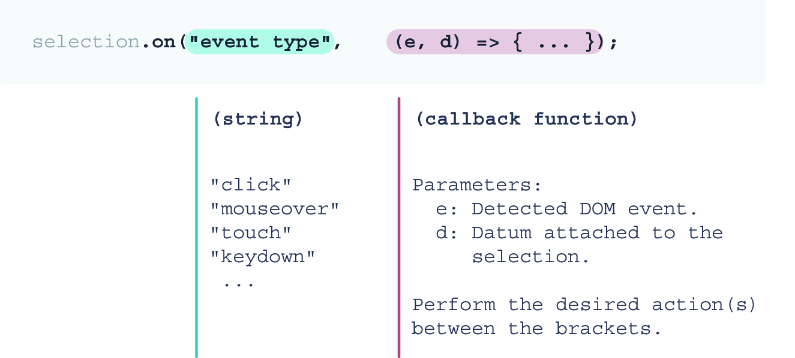
The event name tells a selection what to watch for, and the callback supplies the response when that event occurs. section 7.2.1
Use an event handler as a small bridge between a user action and a visible response:
- Handle a click on a filter button, inspect its bound datum, update the active button state, and redraw the histogram with the selected data. section 7.2.1
- Handle mouseenter and mouseleave on chart circles to show, position, and hide an SVG tooltip using the event target and attached data. section 7.3.1
- Handle window resize to recalculate label sizes, or update SVG dimensions and layout for a changed screen width. section 9.2.1 section 14.4.1
- Reattach handlers when newly entered DOM elements need the same interaction behavior. section 7.4.3
Show a data-point tooltip
Select the line chart’s circles and register mouseenter and mouseleave handlers. On entry, read the datum to format the temperature, use the event target’s cx and cy attributes to place the tooltip, then fade it in. On exit, hide it and move it away. This makes each point reveal its own value without permanently crowding the chart. section 7.3.1
Event objects provide details such as coordinates, type, and target. The target identifies the element where the event happened; its bound datum is also available directly as the callback’s second parameter. Choose event types that fit the interaction, including click, mouseover, touch, and keydown. section 7.2.1
Handlers can support responsive design as well as pointer interactions. A resize response can reuse one resize function at page load and after screen changes, avoiding duplicated styling logic. Updating an SVG container on resize takes more work than relying only on viewBox scaling, but permits width-specific layout changes and preserves readable label sizes. section 9.2.1 section 14.4.1





















