An event handler is a method that runs when a software component raises an event. In a .NET MAUI app, a button click can trigger the handler that coordinates the next actions. section 3.2
FindMe button
The FindMe app wires the button to OnFindMeClicked. The handler checks location permission, requests it when necessary, and calls ShareLocation when access is granted. ShareLocation reads the user’s name, obtains a location, and shares a Bing Maps link through the share API. section 3.2
Figure 3.7 When the user clicks the Find Me button, an event is raised, and the OnFindMeClicked event handler in the code-behind is triggered (1). This uses the .NET MAUI permissions APIs to verify that the user has granted the app permission to access the location (2). It then calls the ShareLocation method (3), which gets the user’s name from the UsernameEntry field in the UI (4) and the location from the Location API (5) and shares the user’s name and location using the Share API (6).
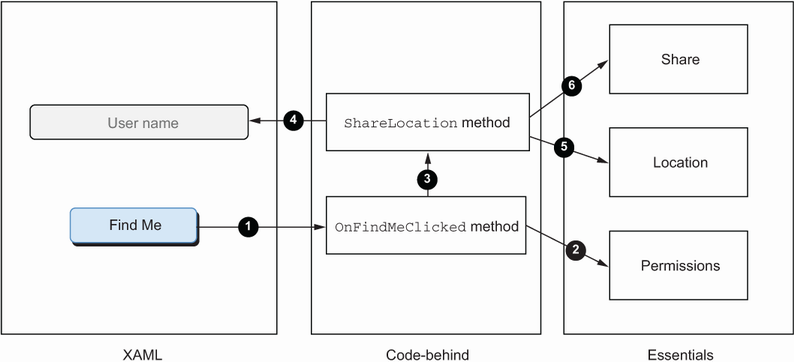
Follow the event flow from the button click to OnFindMeClicked, permission checks, location retrieval, and sharing. section 3.2





















