Clicking an element can also trigger a listener on its parent. If bold text sits inside a link, a click on the bold text can reach the link too. This movement through the document tree is event propagation; it lets a parent respond to events from its descendants. section 8.3
An event normally travels through three phases:
- Capture: from window down through the target’s ancestors. section 8.3.1
- Target: dispatch at the element where the event occurred. section 8.3.1
- Bubble: from the target’s parent back up toward window. section 8.3.1
Highlight the active part of a contact form
Instead of attaching focus and blur listeners to every input, put onFocus on each fieldset and onBlur on their form. When an input receives focus, its fieldset’s listener can mark that section active; the form’s blur listener can clear the highlight. This uses three listeners rather than eight for four inputs. section 8.3
Keep an open menu open for inside clicks
Listen for pointerdown on window to close the menu. Add a pointerdown listener to the menu that calls evt.stopPropagation(). A pointer event inside the menu then does not bubble to the window listener, while one outside can close it. section 8.8.3
By default, a DOM listener handles the target and bubbling phases; addEventListener("click", handler, { capture: true }) listens during capture instead. The event object’s eventPhase identifies the current phase. Watch for exceptions: React’s mouseEnter/mouseLeave and pointerEnter/pointerLeave pairs follow an unusual flow and do not capture. section 8.3.1 section 8.3.3
Figure 8.7 When you click the black button, the browser will start propagating events throughout the nodes in the document starting at the window, moving down through the document tree in the capture phase until the target, and then moving back up the tree in the bubbling phase until it reaches the window.
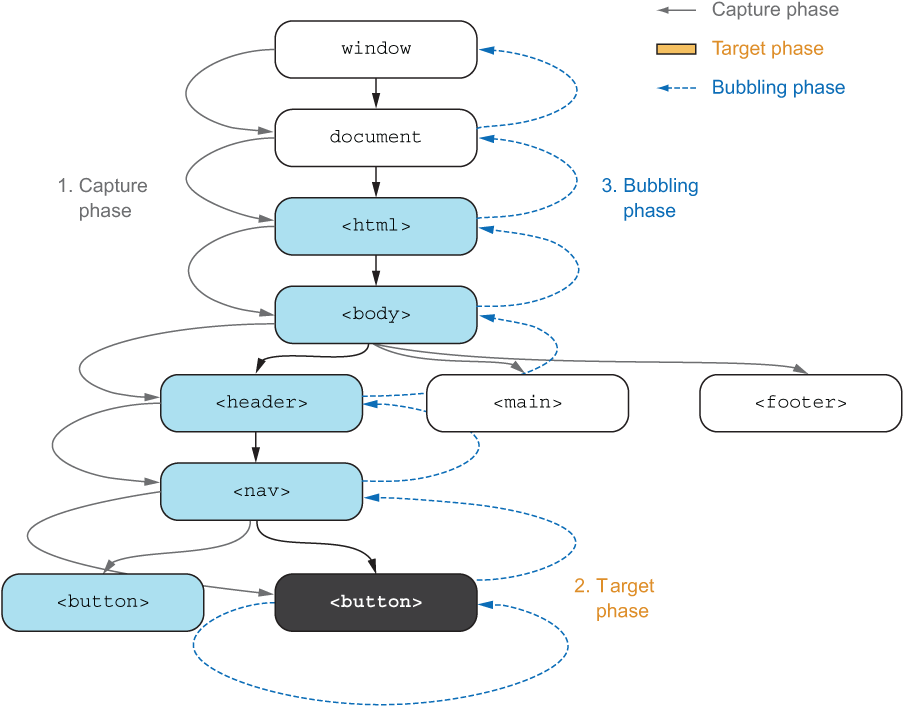
Follow the illustrated route from window to the clicked button and back to see why an ancestor can receive the event. section 8.3.1



