A face-detection algorithm locates faces in camera images and returns their positions. In a face-following camera, the useful result is the center of a detected face: that coordinate tells the robot whether to move its camera left or right. The detector can also draw a rectangle and center marker so its result is visible before motors are involved. section 9.0 section 9.3 section 9.3.2
OpenCV uses Haar feature-based cascade classifiers for this task. A pretrained classifier is supplied as an XML model in OpenCV’s data directory, so detection starts by loading it with CascadeClassifier rather than training a model. Before calling detectMultiScale, convert the camera frame to grayscale and apply histogram equalization to improve contrast. section 9.3.1 section 9.3.2
A reusable detection function can follow this small pipeline:
- Prepare the frame by converting it to grayscale and equalizing its histogram. section 9.3.2
- Run detectMultiScale on the prepared image and check whether any matching rectangles were returned. section 9.3.1 section 9.3.2
- Take a match’s x, y, width, and height values; calculate its center; then return that coordinate. section 9.3 section 9.3.2
- Draw the matching rectangle and center marker on the original frame for a visual check. section 9.3.2
From still image to live camera
First, load photo.jpg, detect and mark its face, and print the center coordinate. For live video, open VideoCapture(0), read a frame on each loop, call the same detection function, and display the marked frame until Q or Esc exits. Reusing the function keeps the camera loop focused on capture and display. section 9.3.2 section 9.4.4
Live detection must keep pace with the camera. At 30 frames per second, measure repeated detection calls and calculate average FPS. If detection is too slow, resize the image before classification: scaling both dimensions to 20% reduces a 640×480 image from 307,200 to 12,288 pixels, a 25× reduction. This setting preserves successful detection here, while substantially smaller scales can hurt accuracy. section 9.4.1 section 9.4.2 section 9.6
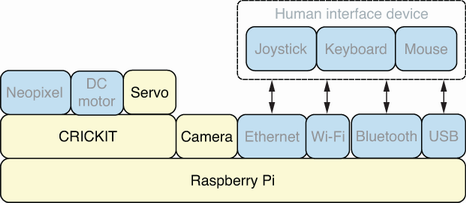
The hardware stack shows how a detected face becomes physical behavior: servo motors pan the camera toward the face. section 9.1
