A file is a named container for persistent text data. Python opens it through a file handle, which lets programs read, write, append, or print text. section 5.2 section 5.5.2
Choose an opening mode that matches the operation:
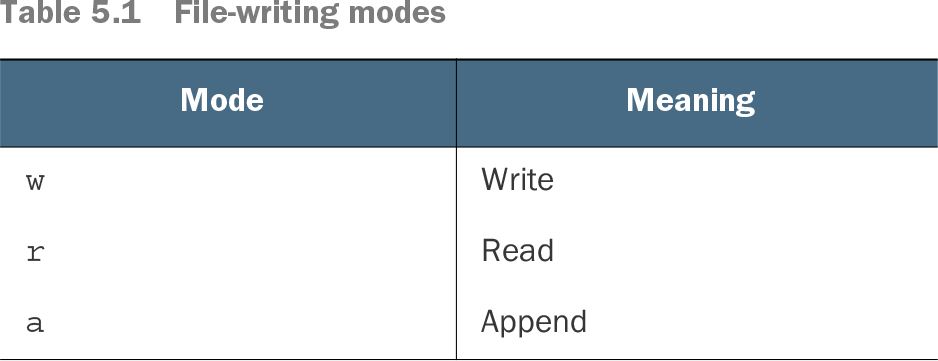
- Use r to read, w to write and replace existing contents, or a to append. section 5.2
- Combine an operation with t for text or b for binary content, such as wt or rb. section 5.2
- Use read() to obtain the entire file as one string, and close() when finished. section 5.2 section 5.5.2
Writing and reading a text file
fh = open('hagrid.txt', 'wt') fh.write("I am what I am an' I'm not ashamed.\n") fh.close() text = open('hagrid.txt').read() print(text) section 5.2
Command-line programs can accept either literal text or a filename. Check with os.path.isfile(), read a matching file, and strip its trailing whitespace so both inputs behave consistently. section 5.5.2
Table 5.1 File-writing modes (view table figure)
Browse the file-writing mode table for the meanings of w, r, and a. section 5.2