A graphics processing unit (GPU) uses many relatively simple computing units to perform similar operations across large amounts of data. Originally designed to update pixels, GPUs also suit data-processing tasks such as applying the same operation across an array or matrix. A CPU has fewer, faster units that can work on different problems; GPU speedups depend on whether the work can be divided into many independent tasks. section 1.2.1 section 9.4
Double 100 array elements
Start with a NumPy array and write each doubled value to a second array. In a simplified sequential model, 100 reads, doublings, and writes cost 18,200 time units. If 100 independent threads perform those steps concurrently, the model costs 240 units despite slower individual arithmetic. These are illustrative assumptions, not benchmark results: the advantage comes from doing independent work at the same time. section 9.1.1
Hardware organization matters when designing that work. A GPU contains streaming multiprocessors, each with many streaming processors and an L1 cache. L2 cache is shared across multiprocessors, with GPU main memory beyond it. This is a simplified architecture: merely moving sequential CPU-style code to a GPU does not exploit its parallel units. section 9.1.3 section 9.4
Figure 9.2 A simplified overview of the main GPU components: streaming multiprocessors that contain streaming processors (CUDA cores) and local cache. The GPU includes all the streaming multiprocessors along with some extra cache and the GPU main memory.
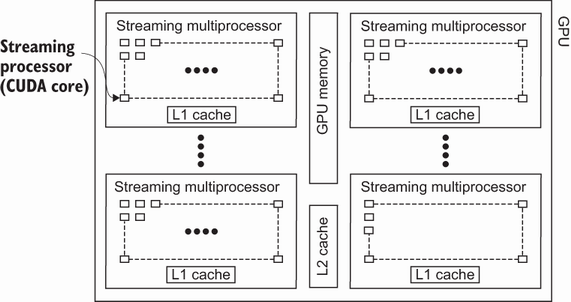
Use the hardware diagram to locate processing units and the caches available within and across streaming multiprocessors. section 9.1.3
Standard Python code does not run directly on a GPU. CuPy offers a NumPy-like interface, and cuDF offers a pandas-like interface. Numba can generate GPU code, but useful acceleration requires redesigning suitable work for parallel execution rather than simply annotating existing Python code. section 9.4













