A heading is a semantic HTML element that marks a section and communicates its structural importance. The hierarchy runs from <h1>, the most prominent heading, through <h6>, the least prominent. Browsers provide default heading sizes, but a deliberate type ramp keeps similar pages consistent and helps users understand how content is organized. section 8.2.3
Use headings as both structural markers and visual elements:
- Choose heading levels for their semantic role rather than their appearance; do not use an <h6> element to style ordinary paragraph text. section 8.2.3
- Map a practical type ramp to H1, H2, H3, and body text, then pair HTML elements with CSS classes when visual styling needs to vary. section 8.2.3
- Balance heading size, line height, and margins so sections are clearly separated while related subtitles remain visually connected. section 10.5
A compact heading ramp
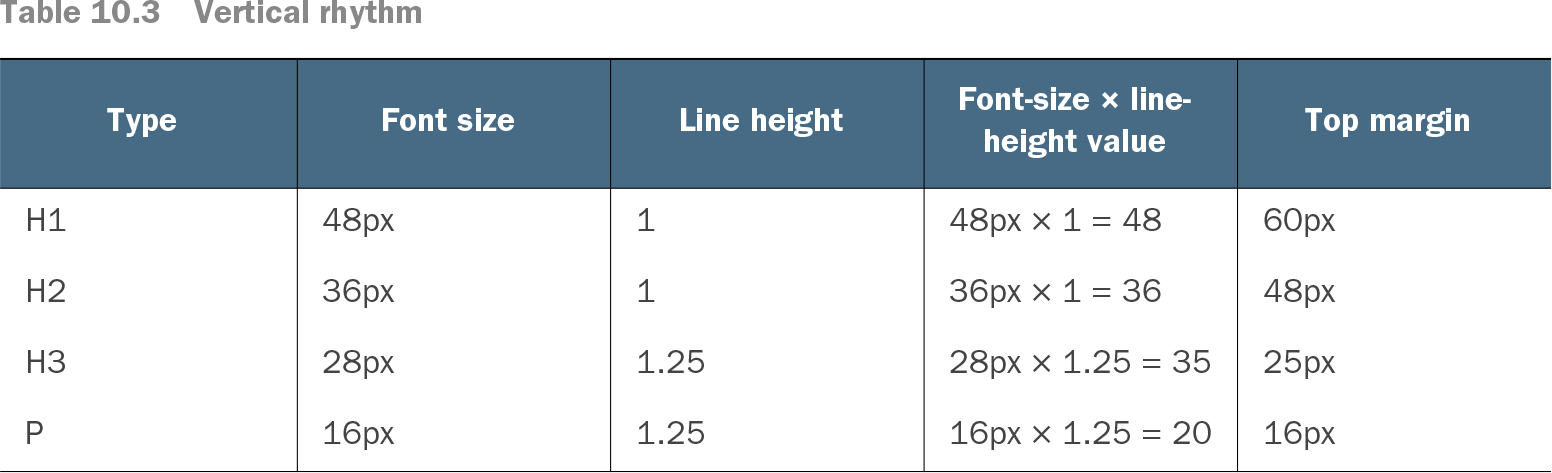
A sample ramp uses H1 at 48px, H2 at 36px, H3 at 28px, and body copy at 16px. Its line heights are 48px, 36px, 35px, and 20px; top margins are 60px, 48px, 25px, and 16px. These values create stronger separation before new sections and tighter spacing within a section. section 10.5
Table 10.3 Vertical rhythm (view table figure)
Compare heading sizes, line heights, and top margins in a complete vertical-rhythm table. section 10.5