Headroom is the remaining margin between current resource or performance usage and an applicable budget limit. It shows how much capacity remains before a change requires cleanup, negotiation, or an exception. section 6.3.3 section 6.5.2
Use headroom to make budget pressure visible and actionable:
- Allocate it explicitly across teams, features, and reserve pools instead of allowing shared capacity to disappear silently. section 6.3.3
- Set enforcement thresholds below user-facing goals, preserving a buffer that catches degradation before users notice it. section 6.4
- Track it in a shared budget document so engineers can see remaining capacity and follow an explicit exception process. section 6.5.2
- Treat shrinking headroom as an early warning: initiate cleanup below 10% rather than waiting for the budget to break. section 6.4
Search API pressure
A search API with a 150ms budget and only 8ms of headroom has little room for the next feature touching search. The team can optimize existing work, negotiate a trade-off, or request an exception with documented conditions. section 6.5.2
Figure 6.2 A budget allocation dashboard showing each team's current usage against their allocation. Core is nearly at capacity, while Analytics and Reserve have room for growth.
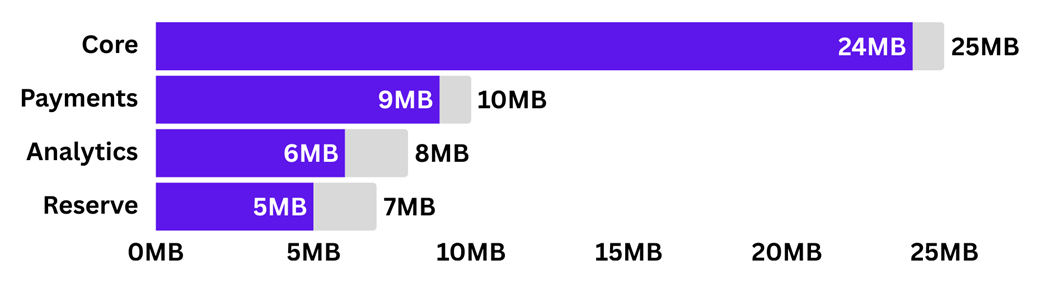
Use the allocation dashboard to compare each team's current usage with its allocation and identify where capacity is nearly exhausted or still available. section 6.3.3
Table 6.2 Starting point thresholds for common performance budgets
|
Platform
|
Resource
|
Aggressive
|
Moderate
|
Relaxed
|
|
Web
|
JavaScript bundle (compressed)
|
< 150KB
|
< 250KB
|
< 400KB
|
|
Web
|
Total page weight
|
< 1MB
|
< 2MB
|
< 4MB
|
|
Backend
|
API response time (p95)
|
< 100ms
|
< 200ms
|
< 500ms
|
|
Backend
|
Query time (p95)
|
< 20ms
|
< 50ms
|
< 100ms
|
|
Mobile
|
Cold start time
|
< 2s
|
< 3s
|
< 5s
|
|
Mobile
|
App size
|
< 30MB
|
< 50MB
|
< 100MB
|
|
Mobile
|
Memory (typical use)
|
< 100MB
|
< 200MB
|
< 400MB
|
|
Desktop
|
Launch time
|
< 2s
|
< 4s
|
< 8s
|
|
Desktop
|
Idle memory
|
< 300MB
|
< 500MB
|
< 1GB
|
Use the threshold table to establish starting budgets for bundles, page weight, API latency, startup, memory, and launch time. section 6.4