Hexadecimal is a base-16 positional numeral system. It uses sixteen digit values: 0–9 and, conventionally, a–f. In Rust, hexadecimal integer literals begin with 0x, so 0x12C represents 300: 1 × 256 + 2 × 16 + 12. section 2.3.2
Writing and formatting hexadecimal values
Rust accepts hexadecimal literals alongside binary and octal literals: let three_hundred = 0x12C; println!("decimal: {}", three_hundred); println!("hexadecimal: {:x}", three_hundred); The value prints as 300 in decimal and 12c in hexadecimal. The same integer can therefore have different written representations without changing its value. section 2.3.2
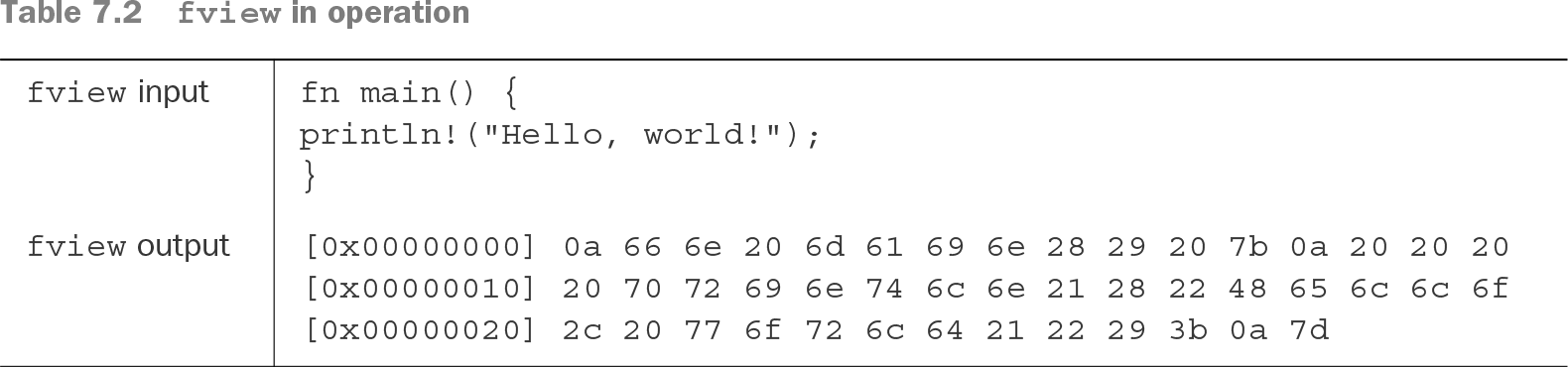
Hexadecimal is especially useful for viewing bytes. Two hexadecimal digits represent every value from 0x00 through 0xff, covering all 256 possible bit patterns in one byte. A hexdump displays file data this way, pairing each byte with an address such as [0x00000000]. Values such as 0x0a can also reveal control characters such as newline. section 7.3
Listing 2.4 Using base 2, base 8, and base 16 numeric literals
 fn main() {
   let three = 0b11;             #1
   let thirty = 0o36;            #2
   let three_hundred = 0x12C;    #3

   println!("base 10: {} {} {}", three, thirty, three_hundred);
   println!("base 2:  {:b} {:b} {:b}", three, thirty, three_hundred);
   println!("base 8:  {:o} {:o} {:o}", three, thirty, three_hundred);
   println!("base 16: {:x} {:x} {:x}", three, thirty, three_hundred);
 }
Compare binary, octal, decimal, and hexadecimal literals and observe how Rust prints the same values in each base. section 2.3.2
Table 7.2 fview in operation (view table figure)
Inspect a concrete hexdump of a short Rust source file, including byte addresses and hexadecimal byte pairs. section 7.3