State is the information an application keeps track of that makes it look and behave a particular way at a particular moment. In a to-do app, the list of to-dos is state: adding an item changes what the page should display. The page title, by contrast, can remain static. section 2.2
Decide what belongs in state by asking what the application must remember to produce its next view:
- With direct DOM access, a to-do app can keep just an array of descriptions and read the new item’s text from the input element. section 2.2.3 section 6.3.1
- When a framework handles DOM manipulation, keep relevant input values in state too. The to-do state then includes the items, text being typed, and the index, original text, and edited text of an item being edited. section 6.3.1
The view follows state. A render function can receive a list of to-dos and return a virtual DOM list. After the list changes, reevaluate that virtual DOM and update the real DOM to match. A state manager connects user input to this process: it changes state and notifies the renderer. In a small counter, for example, clicking a button emits an action that changes the count; the button then displays the new number. section 3.8.2 section 5.0 section 6.2
Figure 3.5 The view of an application is a function of the state. When a new to-do item is added to the state, the virtual DOM is reevaluated, and the DOM is updated with the new to-do.
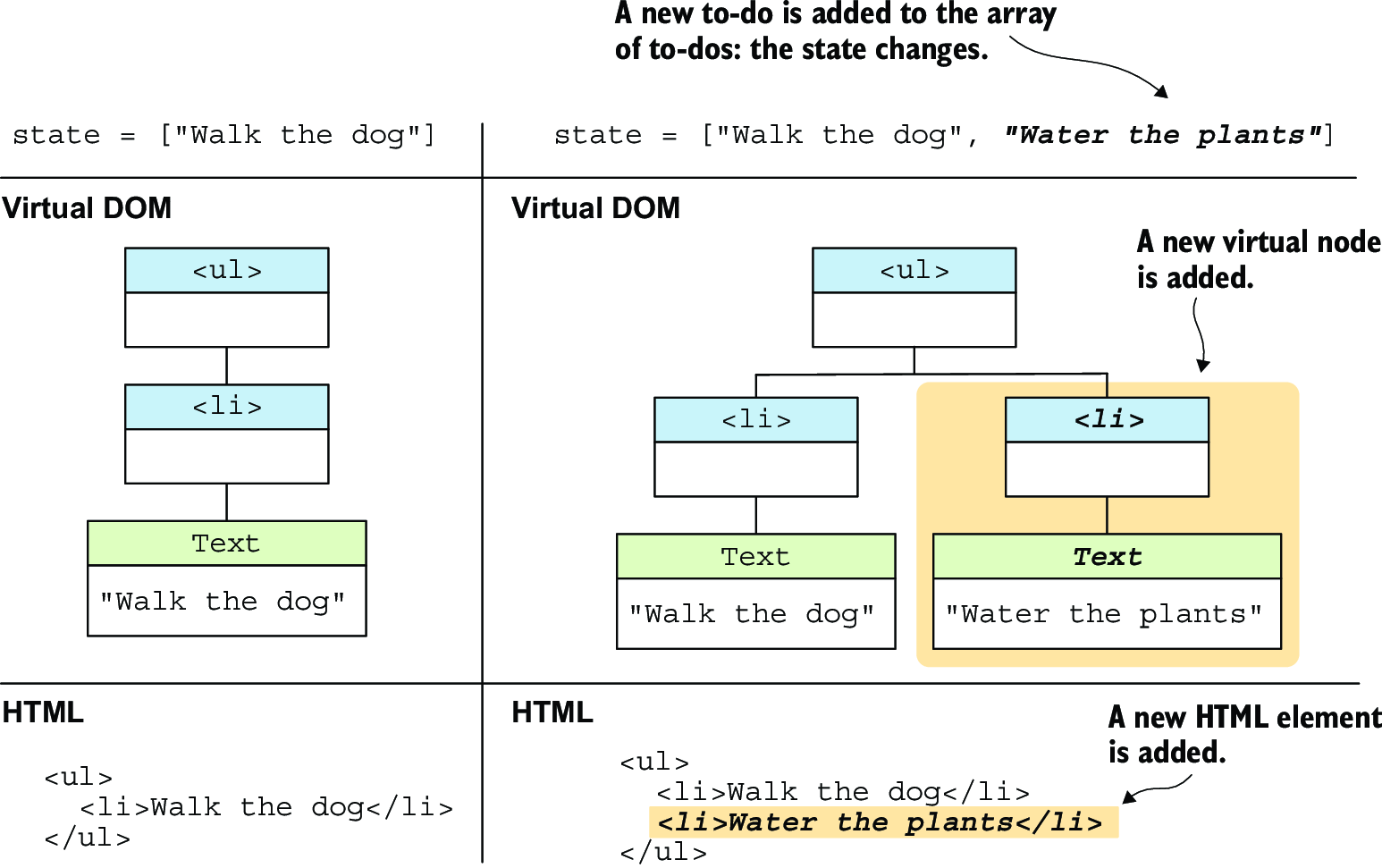
Follow one added to-do from changed state through the reevaluated virtual DOM to the updated page. section 3.8.2
State can also belong to an individual component rather than one application-wide object. Give each component instance an initial state with a state() function; it may use props to choose initial values. Keep props—the data received from a parent—distinct from state—the data maintained internally. Update component state through updateState() rather than changing its state property directly: the method merges the new values and patches the component’s view. A parent’s state change can also send new props to child components. section 9.0 section 9.1.1 section 9.3 section 11.1.4
Why a list needs component identity
Imagine three counters, each holding its own count, then remove the middle one. Those counts live inside component instances, not in their virtual DOM nodes. Comparing the old and new lists without distinguishing the instances can remove the wrong counter and leave the wrong count visible. State determines the view, but hidden component state alone cannot identify list items during reconciliation. section 12.0






































