A button that changes its label, a clock that ticks, and a task list that responds to clicks all need values that can change. In React, state stores those values so a component can display the current result and update it after an interaction. A component without its own state changes only when its parent gives it new properties. section 5.0 section 5.1.1
Start with a click counter
A functional component can initialize state, display it, and update it through the setter: const [counter, setCounter] = useState(0); <p>Clicks: {counter}</p> <button onClick={() => setCounter(value => value + 1)}>Increment</button> The update function receives the current value and returns the next one. Changing an ordinary variable instead would not tell React to update the display. section 5.2 section 5.2.5
State belongs to a component, but its effects need not stay there. When several components need the same value, place it in a component above them and pass the value or an update function down as properties. “Global” here can mean shared across the relevant part of the component tree; it need not mean one value available to every component. Keep state as close as practical to the components that need it: a clock can own its time, while a menu and page display may need their current-page value in a common ancestor. section 5.1.2 section 5.2.7
Figure 5.4 Current page state is required in the two components marked in a darker gray. You can then put your current page state in the two components marked with a dashed border. These are the common ancestors of the two target components.
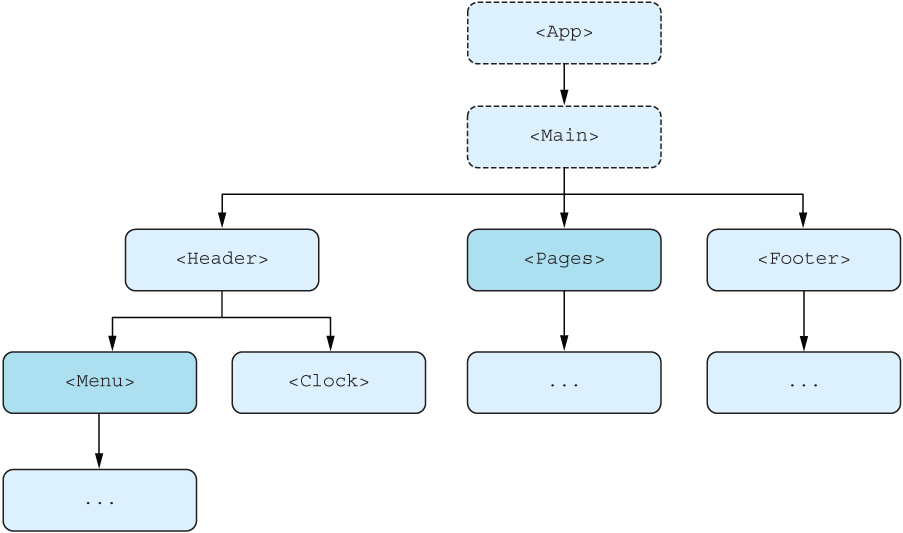
The component-tree diagram identifies the common ancestors that could hold current-page state needed by both the menu and page display. section 5.1.2
Share a task list
A task application holds its tasks and a hide-completed flag. It passes the flag and its setter to filter buttons, and task data and an update action to task components. The children handle their own rendering and clicks; the parent retains the shared values. When removing a task from an array, pass a new array to the setter rather than changing the existing array and passing it back—otherwise React may not re-render. section 5.2.7 section 5.2.5
Choose what to keep and where to keep it:
- Keep application data that must survive a child component unmounting in a persistent component; React Context is another approach to shared data. section 5.1.3
- Keep short-lived UI state, such as an open menu, local when only that component needs it. Form data is another common category of state. section 5.1.3
- Do not store unchanging values, copies of shared state, or values you can calculate from other state. Aim for one source of truth. section 5.1.4
Functional components can use separate useState calls for separate values. Class-based components instead keep values in one state object and update it with setState; their update behavior differs. In either style, decide who needs a value before deciding which component should own it. section 5.2.6 section 5.3.2






































