HSL represents color through hue, saturation, and lightness. Its cylindrical arrangement places hue around a circular axis, making color changes easier to anticipate than changing RGB channels directly. section 11.2.1
Use HSL when you need to reason about color changes at a glance:
- Adjust lightness to make a color lighter or darker without thinking in separate red, green, and blue channel changes. section 11.2.1
- Rotate hue to explore related colors through a circular color arrangement. section 11.2.1
- Prefer HSL when browser compatibility is more important than using newer wide-gamut color notations. section 11.3
Convert a color with DevTools
Open DevTools with F12, select the html element in Elements, and find a color in the Styles panel. In Chrome, Shift-click its color swatch and choose HSL from the notation menu; Firefox and Safari cycle notations when you click the swatch. section 11.3
Figure 11.11 HSL polar color space
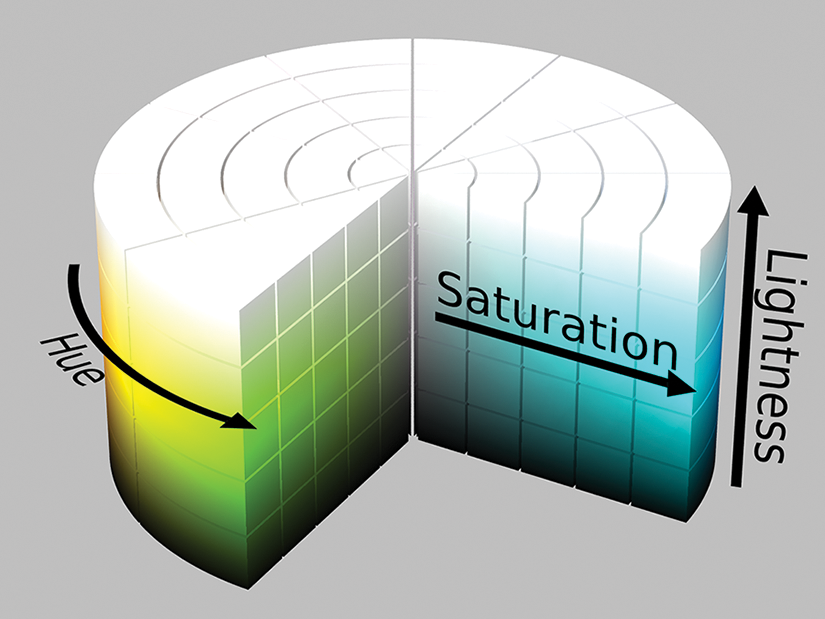
Inspect the polar model that places hue around a central axis. section 11.2.1



