The HSL method specifies a CSS color with hsl() by dialing three controls: hue, saturation, and lightness. Hue picks a place on the color wheel; saturation controls how gray or pure it looks; lightness controls how dark or light it becomes. section 17.1 section 17.4
Figure 17.2 Hue refers to the position on the color wheel, starting at 0 (red) and passing through 120 (green) and 240 (blue).
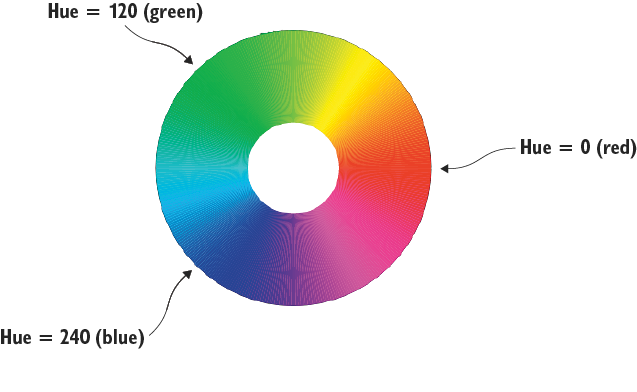
Use hue like a trip around the color wheel: 0 is red, 120 is green, and 240 is blue. Values run from 0 through 359. section 17.1
The three hsl() ingredients do different jobs:
- Hue is the color-wheel position from 0 to 359. Moving upward travels through yellow, green, blue, and violet from red. section 17.1
- Saturation is a percentage from 0% to 100%. At 100% the hue is pure; reducing it mixes in gray, and 0% reaches grayscale. section 17.1
- Lightness is a percentage from 0% to 100%. At 0% the result is black; at 100% it is white; lower values are darker. section 17.1
Color an h1 with HSL
Use hsl(hue, saturation, lightness) as a color value. For example, color: hsl(300, 100%, 25%); gives an h1 purple text. Replace the first number with a hue from 0–359 and the percentages with values from 0–100%. section 17.4
Figure 17.3 Saturation is a measure of a color’s purity or how much gray is mixed in. The color wheel in Figure 17.2 is set to 100% saturation. The lower the saturation percentage, the grayer the color appears.
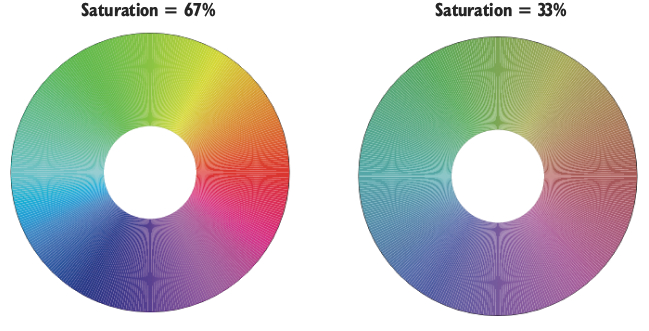
Lower saturation turns a vivid hue progressively grayer. It is the “less color, more gray” knob. section 17.1
Figure 17.4 Lightness measures how dark or light a color appears. The color wheel shown previously in Figure 17.3 is set to 50% lightness. Higher percentages produce lighter colors, and lower percentages produce darker colors.
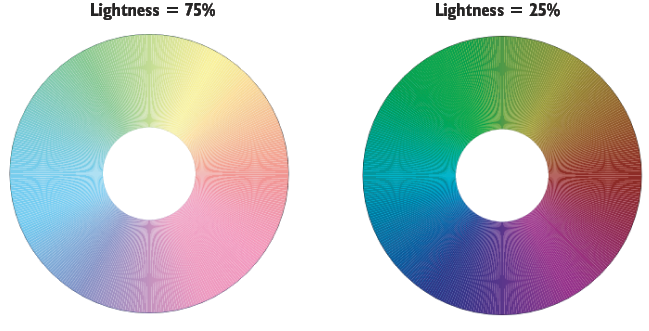
Lightness changes a hue from black at 0% toward white at 100%; 50% is the illustrated middle setting. section 17.1
HSL is especially handy when colors need to cooperate rather than merely exist in the same room. Complementary hues sit 180 degrees apart, analogous hues are about 30 degrees apart, and triadic hues are 120 degrees apart. Use a main hue and reserve companions for accents such as buttons or borders. section 17.6
For transparency, use hsla() or add a fourth alpha value to hsl(). Alpha runs from 0.0, completely transparent, to 1.0, completely opaque. Keep text readable unless a little see-through mischief is a deliberate design choice. section 17.4



