The HSL method makes a familiar frontend task—tuning a color for a heading, theme, or animation—more direct. Instead of balancing red, green, and blue channels, write a color as hue, saturation, and lightness: hsl(300 100% 25%) produces a dark, vivid purple. CSS also accepts an alpha value after a slash, such as hsl(300 100% 25% / 0.75). section 7.1.2
Hue is a position around the color wheel: 0° is red, 120° green, and 240° blue; the scale wraps so 360° returns to red. Saturation measures purity: 100% is fully colored, while 0% is grayscale. Lightness measures vertical brightness: 0% is black, 50% is normal brightness, and 100% is white. In cylindrical terms, hue is angle, saturation is distance from the center, and lightness is height. section 7.1.2
Figure 7.2 You can visualize the HSL color model as a cylinder.
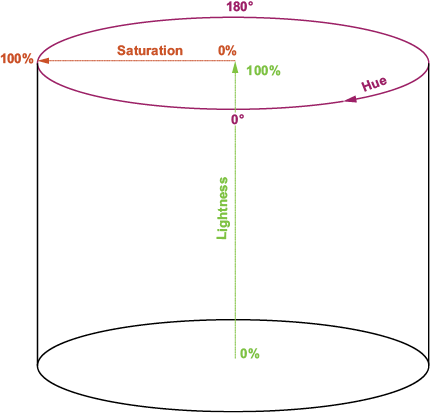
Use the cylinder view to connect a hue rotation with color-wheel movement, saturation with distance from gray, and lightness with brighter or darker variants. section 7.1.2
HSL supports predictable adjustments without replacing the whole color:
- Make a color lighter or darker by changing only lightness. section 7.1.2
- Create a pastel by lowering saturation and increasing lightness. section 7.1.2
- Create a complementary color by adding 180° to the base hue, wrapping within 360°. section 7.3.1
- Create analogous colors by moving roughly 30° above and below the base hue, or 15° for less contrast. section 7.3.2
- Create a triadic scheme with hues 120° apart. section 7.3.3
Build a CSS color scheme from one hue
Keep hue as a custom property and derive related colors with calc(). A base hue of 39 can drive both a main color and its complement: --main-color: hsl(var(--base-hue) 100% 50%); --comp-color: hsl(calc(var(--base-hue) + 180) 100% 50%). CSS handles the hue wraparound, so the scheme remains adjustable from one value. section 7.3.1
HSL can also be calculated from RGB when existing colors are stored as channel values. Normalize RGB values to 0–1, find their maximum and minimum, then derive chroma, lightness, saturation, and hue. A zero chroma value is grayscale, so hue and saturation become 0. The reverse conversion normalizes HSL, handles zero saturation as gray, and computes RGB channels before scaling them to 255. section 7.2.2 section 7.2.3
Tie color to scroll progress
A reading-progress bar can use scroll progress for both width and hue. With progress from 0 to 1, multiply by 120 to move from red at the top to green at the bottom, then assign hsl(hue, 70%, 50%) as the background color. The same calculated value visibly communicates both completion and state. section 13.3.1
For a basic dark-mode transformation, preserve hue and invert lightness with 100 − L. Automated paired palettes can additionally reduce saturation, apply a small hue shift, and test the resulting foreground/background pairs for contrast. HSL gives direct control over these changes, although OKLCH is identified as better when perceptual lightness fidelity matters. section 7.5.2 section 7.5.4



