HTML—Hypertext Markup Language—is the set of small text codes used to give a web page structure. Think of it as the framing of a house: it says what belongs on the page, what each piece is, and the order in which those pieces appear. A browser reads that markup and renders headings, paragraphs, lists, images, and links instead of showing the tags themselves. section 1.1 section 1.2
The name sounds more alarming than the job. Hypertext refers to links that take a visitor to another page. Markup means instructions placed in a text document for how its content should be organized. HTML is a language of markup, not a programming language: it describes content rather than handling tasks such as accounts, database requests, or changing page elements on the fly. section 1.1 section 1.3
Figure 1.2 With some HTML applied, the text from Figure 1.1 becomes easier to read, navigate, and understand.
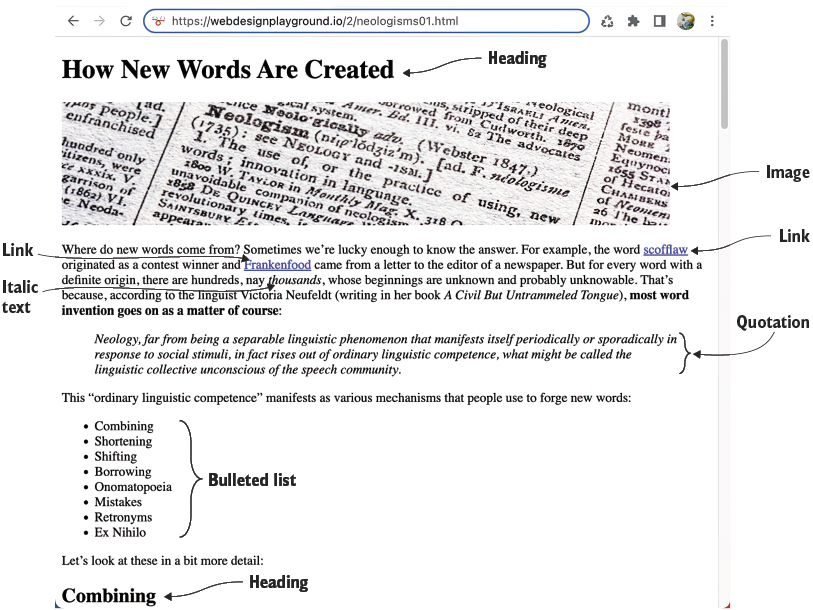
Compare plain text with marked-up text: HTML makes the same words easier to read, navigate, and understand. section 1.1
HTML does its work through tags. A tag uses angle brackets around an element name, such as <p> for a paragraph, <em> for emphasis, or <h1> for a top-level heading. Most elements wrap their content with an opening tag and a matching closing tag; the closing tag adds a forward slash. Together, the pair acts like a labeled container for text or other elements. section 2.1
A heading in a container
<h1>How New Words Are Created</h1> The opening <h1> tells the browser where the heading begins; </h1> tells it where the heading ends. The browser then displays the enclosed words as the page’s main heading. Tiny codes, surprisingly bossy results. section 2.1
Figure 2.1 The structure of a typical HTML tag
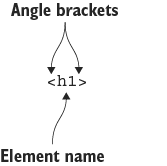
Use the tag diagram to spot its three basic parts: a left angle bracket, an element name, and a right angle bracket. section 2.1
A complete page has underlying structure as well as visible content. Content placed between <body> and </body> appears in the browser’s page area, while header information is used internally, including the title shown in a browser tab. Ordinary spacing and line breaks do not reliably create layout: browsers generally ignore extra whitespace, so HTML tags provide structure and CSS handles styling. section 2.7 section 1.2
First visible page text
<!DOCTYPE html> <html lang="en"> <head> <meta charset="utf-8"> <title>A page</title> </head> <body> Hello HTML World! </body> </html> The words inside the body are what appear in the browser window. section 2.7
HTML supplies the structure; CSS supplies the finishing work.
- Use HTML to identify content as a heading, paragraph, list, link, image, or another page element. section 1.1
- Use CSS to change presentation, including typefaces, colors, layout, and animated effects. section 1.2
- Use a programming language such as JavaScript or PHP when a page must process form data, work with accounts, retrieve remote data, or change dynamically. section 1.3
Once the basics are comfortable, HTML can describe a page more precisely. HTML5 layout elements include <header> for introductory content, <nav> for navigation, <main> for a page’s unique content, <article> for a self-contained composition, <section> for outline-worthy parts, <aside> for related-but-not-directly-related content, and <footer> for closing content. HTML also extends beyond the familiar <div>, <p>, and <span> with elements for abbreviations, variables, links, special characters, and comments. section 11.11 section 16.0
Figure 1.4 To go from HTML and CSS to a web page, you send your code to a web server, and visitors use their web browsers to retrieve and render your code into a page.
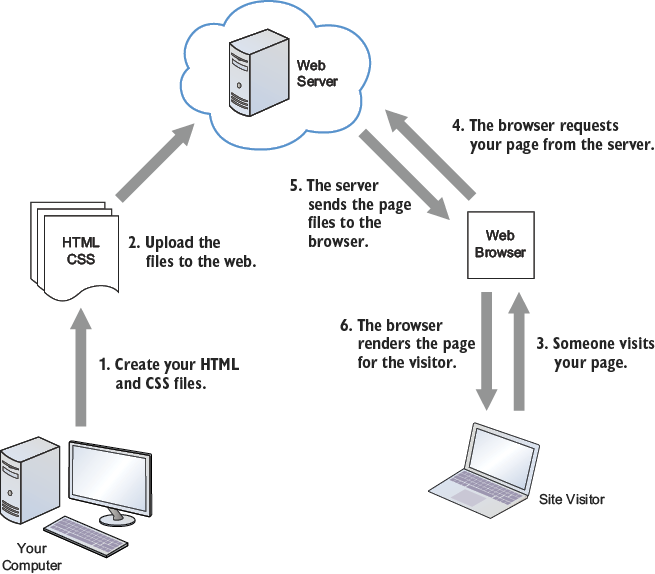
Follow the route from typed files to a visible page: upload HTML and CSS to a web server, request them in a browser, and let the browser render them. section 1.4
The most useful way to learn HTML is to change a tag, look at the browser result, and try again. An HTML editor and live results area make that loop quick: type markup, add any needed attributes, inspect the result, then fix problems or experiment further. Start with a small page, build its structure, and fill in one section at a time. section 1.5 section 5.7











