Instrumentation inserts runtime measurement into an executing application so you can inspect behavior that sampling alone cannot reveal. It is useful when an abnormal memory signal needs code-level explanation or when poorly understood code must be investigated. section 9.1 section 6.0
Use instrumentation as part of an investigation:
- Observe a high-level symptom, such as unusual memory consumption, in VisualVM. section 9.1
- Sample memory usage to identify object types, instance counts, and approximate memory occupancy. section 9.1
- Instrument the relevant execution to obtain additional details about the code responsible for the behavior. section 9.1
- Interpret the results instead of assuming that one tool explains every failure; a thread dump may be sufficient for some investigations. section 8.3
Investigating excessive allocations
Start project da-ch9-ex1, connect VisualVM, and call the /products/1000000 endpoint. If the memory widget shows abnormal usage, sample the execution and sort results by occupied memory or live instances. A large number of Product objects points toward the capability creating excessive allocations; instrumentation can then provide more detail about that execution. section 9.1
Figure 9.1 The memory widget in the Monitor tab in VisualVM helps to identify whether the app spends more memory than usual at any given time. Often, widgets in the Monitor tab, such as CPU and memory consumption, give us clues on how to continue our investigation. When we see that the app consumes an abnormal amount of memory, we may decide to continue with memory profiling the execution.
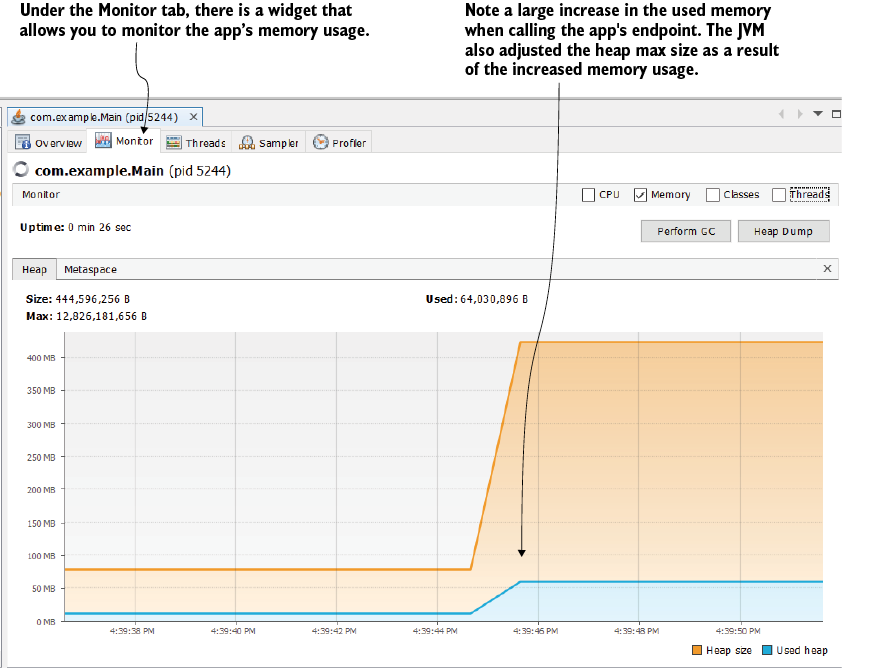
The memory widget provides the initial signal for deciding whether to continue with memory profiling. section 9.1












