An IP address acts as a host’s identity on a network, providing the destination used to send and receive packets. When a user enters a domain name such as www.google.com, DNS translates that name into an IP address so the computer can send packets to the server. section 3.1.1 section 4.1
Hosts normally receive an IP address with related network settings:
- A netmask identifies which addresses belong to the local LAN. section 4.1
- A default gateway enables communication with devices in different LANs. section 4.1
- A DNS server address translates human-readable domain names into IP addresses. section 4.1
- DHCP leases these settings automatically, avoiding the scale, typing errors, and inflexibility of manual configuration. section 4.1
DHCP assigns an IP address through DORA: the client sends DISCOVER, the server returns OFFER, the client sends REQUEST, and the server confirms with ACK. DHCP uses UDP 67 for servers and UDP 68 for clients. section 4.1.1 section 4.1.1
Figure 3.1 Elements of a URL. The scheme identifies the protocol, and the authority identifies the server’s name; they are separated by “://”. The path identifies the resource on the server.
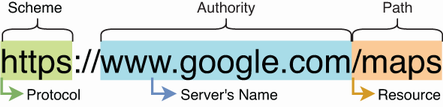
Use the URL diagram to distinguish a domain name, which requires DNS translation, from the IP address used for packet delivery. section 3.1.1
Figure 4.2 Leasing an IPv4 address via DHCP (the DORA process): (1) DISCOVER from client to server, (2) OFFER from server to client, (3) REQUEST from client to server, (4) ACK from server to client.
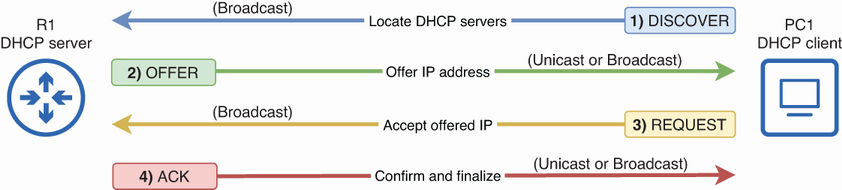
Use the DORA sequence to trace how a client obtains an IPv4 address from a DHCP server. section 4.1.1



