An IP address is a Layer 3 identifier used to address packets to their final destination host across interconnected networks. Unlike a MAC address, which changes at each hop to identify the next device, the destination IP address remains the same throughout the journey. IPv4 and IPv6 are the two IP versions in use; they use different address formats. section 4.3.1 section 4.4
IPv4 addresses provide the practical foundation for understanding IP addressing:
- Represent each host at Layer 3 with a 32-bit number written as four 8-bit octets in dotted-decimal notation, such as 192.168.100.100. section 7.3 section 7.3.1
- Divide into a network portion and a host portion; the prefix length, such as /24, states how many bits belong to the network. section 7.3.1
- Group hosts on the same LAN under a shared network portion while assigning each host a unique host portion. section 7.3.1
- Enable routers to make forwarding decisions from destination IP addresses; routers need an appropriate address on each interface connecting a network. section 7.3 section 7.3.2
Assigning IPv4 addresses to a Cisco router
Before configuration, use `show ip interface brief` to check the current state. Enter interface configuration mode, assign an address and netmask, and enable the interface: `R1(config)# interface gigabitethernet0/0` `R1(config-if)# ip address 192.168.1.1 255.255.255.0` `R1(config-if)# no shutdown` Configure G0/1 similarly with `192.168.2.1 255.255.255.0`. Verify the result with `show ip interface brief`; both interfaces should display their addresses and an `up/up` status. section 7.3.2
Figure 4.3 TCP/IP Layer 3. PC1 addresses a message to SRV1’s IP address. Layer 3 is responsible for the end-to-end delivery of the message, whereas Layer 2 is responsible for the hop-to-hop delivery. The destination MAC address of the message changes at each hop, but the destination IP address remains the same throughout the journey.
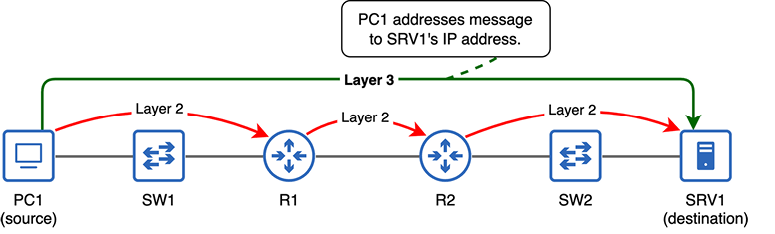
Trace how a packet keeps its destination IP address while its destination MAC address changes at every hop. section 4.3.1



