An IP address is a logical network address that helps identify a device and locate it across networks. Think of it as a street address for data: routers use the destination address to decide where to send it. Unlike a MAC address, which identifies a network interface, an IP address can change when a device connects to a different network. section 11.5.2
Addresses can be assigned in two common ways:
- Static assignment: an administrator configures an address manually. This is useful for servers, printers, and other equipment that should remain reachable at the same address. section 11.5.2
- Dynamic assignment: DHCP automatically provides an available address, reducing the work and errors involved in assigning many addresses by hand. section 11.5.2
Recognizing an IPv4 address
10.23.19.49 is an IPv4 address. It consists of four 8-bit numbers, for 32 bits in total. An organization might give a printer a static address so people can continue to reach it reliably. section 11.12 section 11.5.2
Figure 11.6 Illustration IPv4 address as 32 bits grouped as four bytes in dotted decimal notation
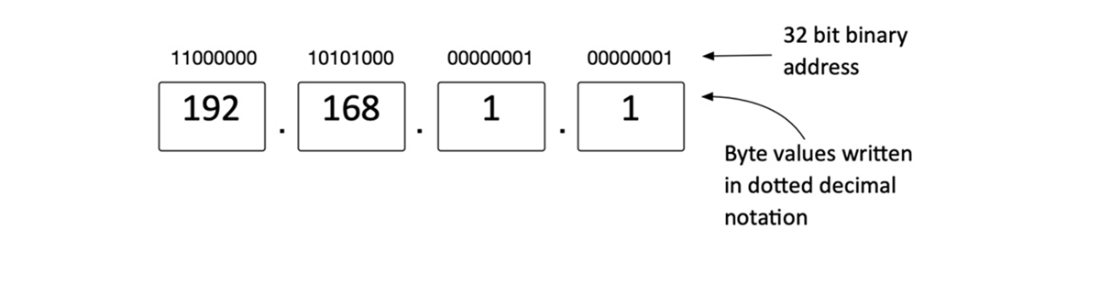
The diagram shows how a 32-bit IPv4 address is grouped into four bytes and written in dotted-decimal form. section 11.5.2
An IP address can also matter when handling personal data. Combined with other information, it may help identify, contact, or locate an individual. section 1.3.3