Jenkins is an open-source automation server for managing scheduled scripts and other jobs through a centralized web interface. Role-based access and credential storage let operators authorize execution without granting users direct permissions on target systems. section 3.2.4
A practical Jenkins automation design accounts for:
- Execution location: PowerShell runs on the Jenkins server unless the job uses PowerShell remoting or a Jenkins node. section 3.2.4
- Parameter passing: replace script parameters with values read from lowercase Jenkins environment variables. section 3.2.4
- Secret handling: bind Jenkins credentials to environment variables, then reconstruct SecureString or PSCredential values when PowerShell requires them. section 4.4.2
- Operational control: use centralized credential stores, graphical management, usage logging, and role-based access. section 3.2.4 section 4.4.2
SQL health check
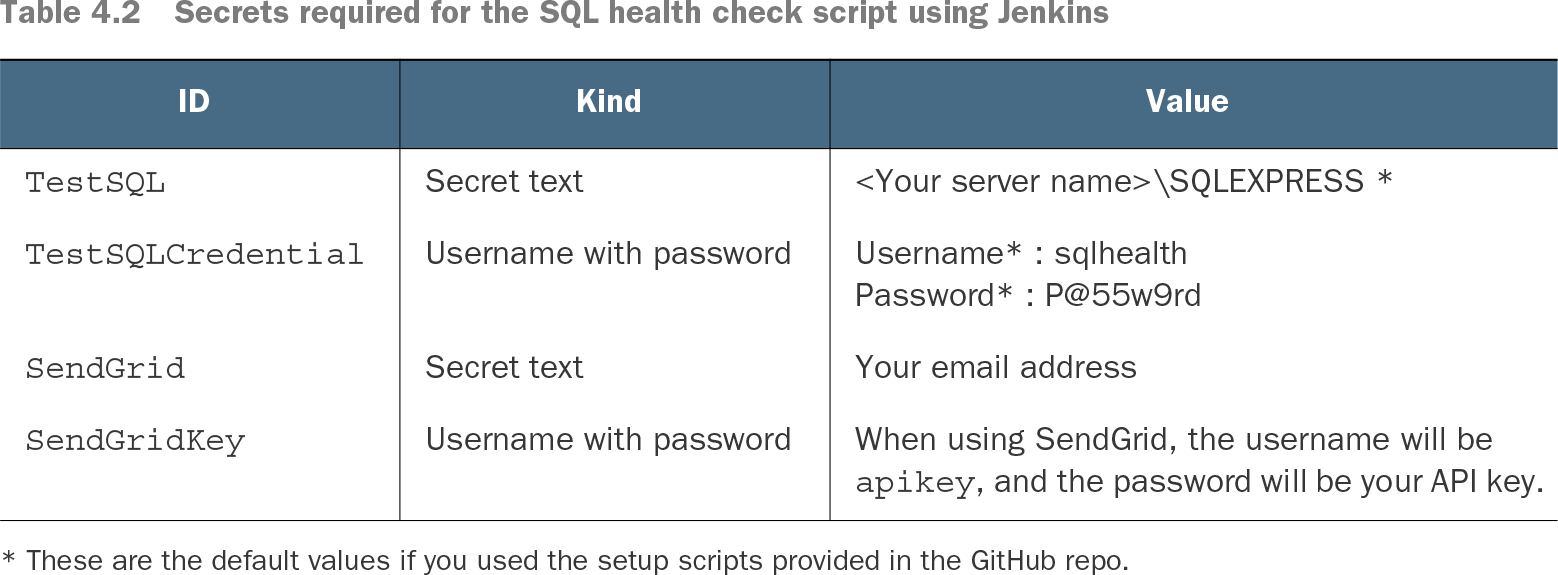
A Jenkins job binds SQL credentials, a SQL instance, and SendGrid values to environment variables. PowerShell converts the username and password back into a PSCredential, invokes a database diagnostic query, identifies databases whose recovery model is not SIMPLE, and uses the notification bindings when a check fails. section 4.4.2
$LogPath = $env:logpath
$ZipPath = $env:zippath
$ZipPrefix = $env:zipprefix
$NumberOfDays = $env:numberofdays
Use the environment-variable pattern to adapt an existing parameterized PowerShell script for Jenkins execution. section 3.2.4
Table 4.2 Secrets required for the SQL health check script using Jenkins (view table figure)
| When using SendGrid, the username will be |
||
| * These are the default values if you used the setup scripts provided in the GitHub repo. |
||
Review the credential objects required for SQL and SendGrid automation. section 4.4.2