A company often needs to move database rows into Kafka or write Kafka records to another system. Writing a separate producer or consumer for every integration takes time and can be difficult to scale. Kafka Connect provides a standardized framework for that work. section 11.0 section 11.1
A source connector reads an external system and writes to Kafka, much like a producer. A sink connector reads Kafka and writes to an external system, much like a consumer. Available connectors cover databases, object storage, messaging systems, and data warehouses. section 11.1
Connect works best when input can be treated as partitioned streams with a way to track reading progress. A database table can be one stream, with an increasing ID used to identify rows already read. This makes the choice of connector and its progress-tracking configuration consequential. section 11.1 section 11.8.3
Try a file source
With a file-source connector configured to read /tmp/customers.txt and write to the customers topic, append a line using `echo "New customer" >> /tmp/customers.txt`. Watch it arrive with `kafka-console-consumer.sh --topic customers --from-beginning --bootstrap-server localhost:9092`. Check `http://localhost:8083/connectors/customers-source/status` if it does not appear. The connector remembers its file position after a restart, but it detects appended lines, not edits to existing lines. FileStreamSource is a proof-of-concept connector, not a production recommendation. section 11.2.3 section 11.3
Connector settings determine what counts as new data. For a JDBC source, `mode=incrementing` with an ID column captures newly assigned, higher IDs but misses updates to existing rows. A timestamp column can capture updates instead; `timestamp+incrementing` is also available. The tracking columns must increase monotonically. section 11.8.3
Figure 11.4 A Kafka Connect cluster consists of one or multiple workers. Tasks are distributed across workers, and Kafka Connect uses three topics to store its internal state.
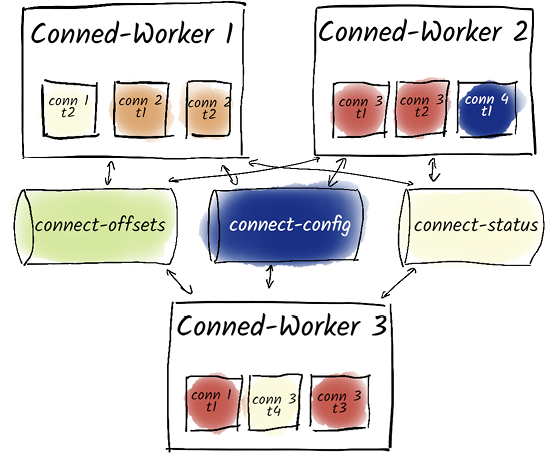
The worker-and-task diagram shows how a distributed Connect cluster spreads connector work across workers and stores internal state in Kafka topics. section 11.3
For more capacity or resilience, run workers in Distributed Mode with the same `group.id`. Connectors divide work into tasks; workers redistribute those tasks when a worker joins or fails. The REST API creates connectors and reports their status, while worker settings govern task distribution and resources. section 11.3 section 11.10
Plan for bad records and unavailable systems. By default, an error fails the connector. `errors.tolerance=all` skips faulty records, so enable error logging and consider alerts; a sink can route unprocessable records to a dead-letter queue. Retries can address transient failures, but longer retry periods can delay a failed status. Monitor connector and task status rather than assuming a running integration remains healthy. section 11.6.2 section 15.3.4



