Kafka Connect moves event records between Apache Kafka and external systems. It abstracts producer and consumer client work behind deployable connectors, so existing databases, search engines, object stores, warehouses, and applications can participate in an event-streaming architecture without each integration requiring a custom client application. Connect runs separately from the Kafka cluster, as one application or several instances. section 1.4.4 section 5.1
Use a source connector to bring data into Kafka and a sink connector to deliver Kafka records elsewhere. Kafka topics are the integration point: once imported, records are available to consumer applications and Kafka Streams. This decouples an existing system from downstream uses of its data while preserving the original application’s workflow. section 1.6 section 5.2
A practical Connect flow has a few distinct parts:
- Select an existing connector suited to the source or destination system; different systems need different handling, and many ready-made connectors are available. section 5.1 section 5.7
- Configure and deploy the connector, commonly by uploading JSON configuration; connector-specific settings identify the topic and external service details. section 5.5 section 5.7
- Apply a Single Message Transform (SMT) when records need lightweight changes while entering or leaving Kafka. section 1.4.4 section 5.7
- Plan for destination failures on sink connectors through error-tolerance and dead-letter-queue settings. section 5.5
- Create a custom connector or transformation only when available components do not meet the integration need. section 5.0 section 5.7
Database registrations to searchable student information
A university keeps its orientation web application and PostgreSQL database unchanged. A JDBC source connector monitors a database table and streams registration updates to a Kafka topic, where departments can consume them immediately. A sink connector can then read that topic and write records to Elasticsearch, enabling roommate-preference searches without building a separate data-gathering pipeline. section 5.2 section 5.5
Figure 5.1 Kafka Connect integrating a database table and a Kafka topic
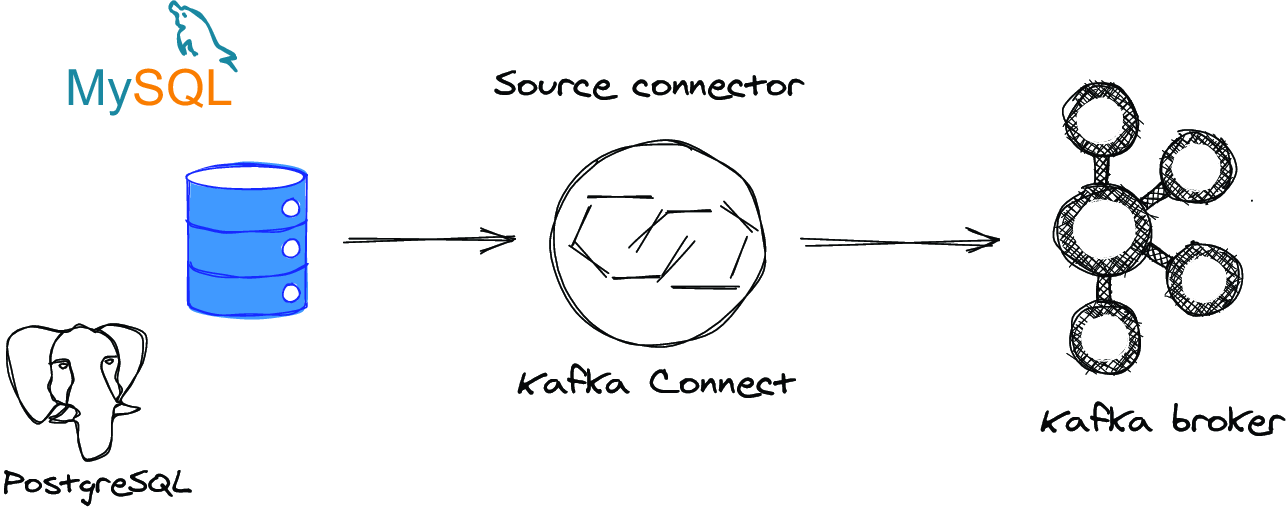
Trace the source-side boundary: database-table updates become records in a Kafka topic that any Kafka consumer can use. section 5.2
Connect is especially useful when an organization needs two-way movement between established architectures and new event-driven applications. For example, change data capture can export database INSERT, UPDATE, and DELETE events to a Kafka topic with low latency, making changes available to downstream consumers while leaving the legacy application in place. section 5.1
Listing 5.4 REST call to install an elastic connector
$ curl -i -X PUT localhost:8083/connectors/
    student-info-elasticsearch-connector/config \
    -H "Content-Type: application/json" \
    -d ‘{
            "connector.class":
         "io.confluent.connect.elasticsearch.ElasticsearchSinkConnector",
            "connection.url": "http://elasticsearch:9200",
            "tasks.max": "1",
            "topics": "postgres_orientation_students",  #1
            "type.name": "_doc",
            "value.converter": "org.apache.kafka.connect.json.JsonConverter",
            "value.converter.schemas.enable": "false",
            "schema.ignore": "true",
            "key.ignore": "false",
            "errors.tolerance":"all",  #2
            "errors.deadletterqueue.topic.name":"orientation_student_dlq",  #3
            "errors.deadletterqueue.context.headers.enable": "true", #4
            "errors.deadletterqueue.topic.replication.factor": "1"  #5

        }’
Inspect a sink-connector REST configuration that names its Kafka topic, Elasticsearch endpoint, converters, and failure-handling settings. section 5.5



