kubectl is the command-line interface for interacting with Kubernetes clusters and inspecting their resources. It provides the operational entry point for exploring cluster state before working with Kubeflow and Argo Workflows. section 8.2
A practical kubectl workflow includes:
- Inspect cluster nodes with kubectl get nodes and examine a node with kubectl describe node. section 8.2.1
- Create and isolate project resources in a namespace with kubectl create ns basics. section 8.2.1
- Create a Pod from a YAML manifest with kubectl create -f, then check its status with kubectl get pods. section 8.2.1
- Inspect execution output with kubectl logs and retrieve the raw resource definition with kubectl get pod -o yaml. section 8.2.1
Inspecting a completed Pod
After creating the whalesay Pod, kubectl get pods reports its readiness, completion status, restart count, and age. kubectl logs whalesay then exposes the Pod's generated hello-world output. section 8.2.1
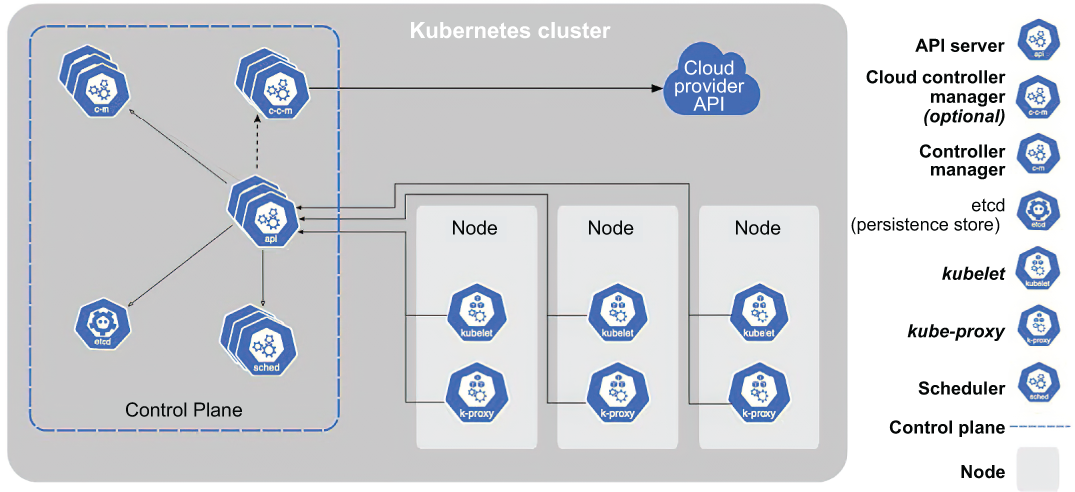
Use the Kubernetes architecture diagram to locate kubectl among the cluster's operational components and understand its interaction point. section 8.2










