A landing page is a welcoming first stop for a visitor. In marketing, it is the page reached from an ad, blog post, or social-media link, where one focused product or service is explained and the visitor is invited to act: buy, subscribe, or sign up. section 10.1
Think of it as a small online storefront window: show what is being offered, make the message easy to scan, and give people a clear next step. A basic page can combine descriptive text, images, and call-to-action buttons. section 10.0 section 10.1
Build a landing page in small, manageable stages:
- Sketch the main page sections and jot down what each will contain before writing code. A quick pencil-and-paper plan is enough. section 10.2
- Start with a basic HTML skeleton, then add each section’s text, tags, and CSS one at a time. section 10.5
- Use horizontal content bands to organize the page into clear strips, such as a header, description, testimonials, or social links. section 10.1 section 10.60
- Add third-party positivity through reviews, ratings, or feedback from testers and users. section 10.41
Banded content solves a friendly readability problem: a background can stretch across the browser window while the words stay in a narrower, centered area. Make each band with an outer div for the full-width background and a nested div for centered content with a maximum width. section 10.36
A product-page pattern
A landing page for a fictitious book can begin with a header and product description, then add an illustration and testimonials. The same pattern can be adapted with your own product, service, words, and images. section 10.1 section 10.41
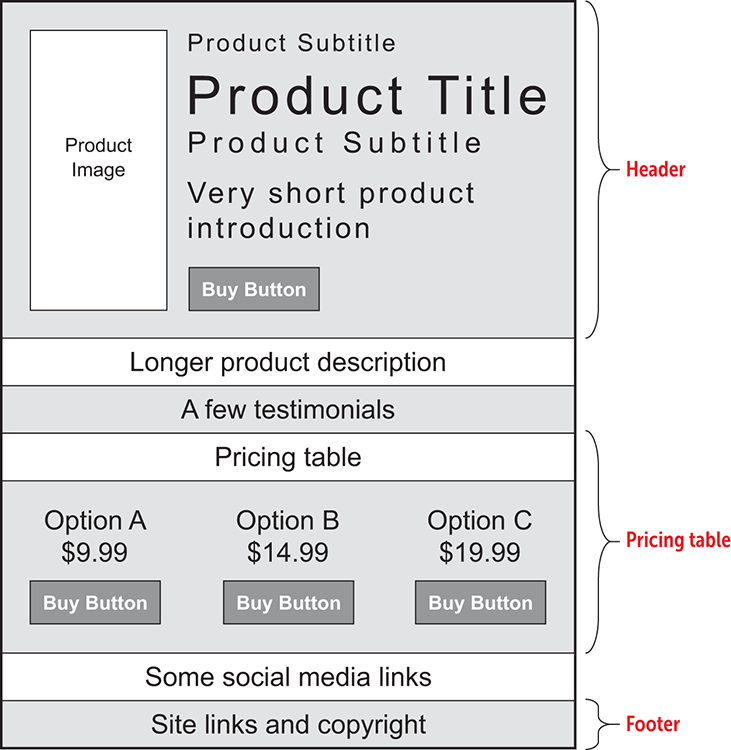
Use the layout sketch as a simple bridge between an idea in your head and the sections you will build in HTML and CSS. section 10.2
A finished page can be easy to read, easy to understand, and visually engaging. Early float-based positioning may require padding and margin adjustments; more robust page layouts are deferred to later layout work. section 10.69

