A landing page is the first page reached from a campaign link in an ad, blog post, or social-media update. Its job is simple: explain one product or service, then invite one clear action—buy, subscribe, download, or sign up. Think of it as a focused sales pitch, not a website attic stuffed with everything you own. section 10.1
Keep the message easy to scan. Highlight the offering and its reasons to matter, then make the next step obvious with a call-to-action button. Clean, legible type helps the product get attention instead of making the font the star of the show. section 10.3 section 10.5
A practical page can be built as full-width horizontal bands, with a shared centered container holding each band’s content:
- Header: a striking but readable hero background, product image, short introduction, price, and call-to-action. section 10.5
- Description and testimonials: explain the offering and add supporting comments. section 10.5
- Pricing table: compare versions, features, prices, and an order button; visually feature a selected price if needed. section 10.5
- Social and footer areas: offer social links plus basic site links and copyright information. section 10.5
PLAY: sketch first, code second. A pencil-and-paper outline only needs the main sections and a note about what belongs in each one. That tiny plan is much easier to translate into HTML and CSS than a design trapped in your head. section 10.2
Figure 10.1 Before you begin coding, grab a pencil and paper, and create a quick sketch of the page layout and content.
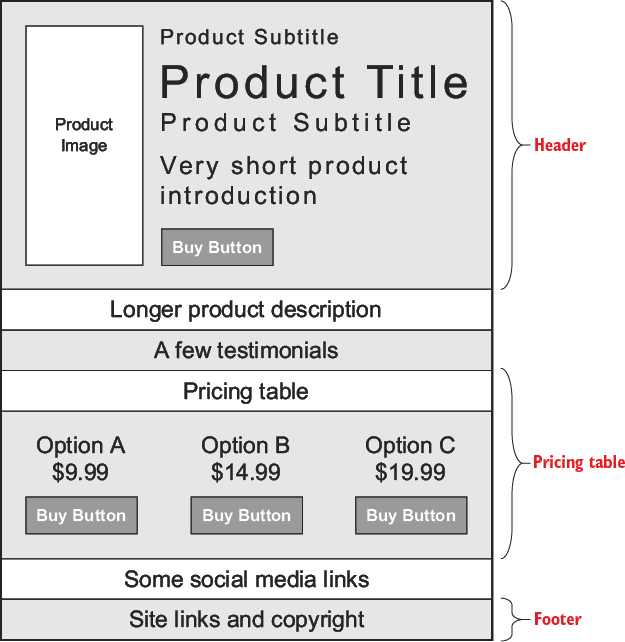
Use the sketch as a low-stakes map: mark the major bands, then label the content each band needs before writing markup. section 10.2
Example: a fictitious book offer
A playful book landing page opens with a cover image, title, short pitch, price, and an “I Want It!” button. Later bands provide a longer description, comic testimonials, three purchase versions, social icons, and footer links. The example demonstrates how one offering can stay visible while each section supplies a different reason to act. section 10.5
REMEMBER: floated columns and generous padding can assemble this design, but they are a workaround rather than a true page layout. When alignment starts feeling fussy, proper layout techniques are the next upgrade. section 10.6

