Layout is the page’s big-picture arrangement: where content goes, what appears together, and what a visitor notices first. A clear layout helps people quickly tell what a page is about and where to find what they need. Before writing HTML or CSS, sketch the main areas on paper; a rough drawing is a useful blueprint, not an art project. section 5.2 section 11.0 section 20.2
A simple layout plan can be built in small steps:
- Mark the major sections and add a short note about each section’s content. section 5.2
- Choose an overall pattern, such as a header, navigation bar, main article, sidebar, and footer. section 11.1
- Let elements follow normal page flow, then place columns beside each other with floats or inline blocks. section 11.12 section 11.22
- Test variations: move the sidebar or add another content column when the page needs it. section 11.21
A content-focused page
The “holy-grail” pattern puts a header at the top, navigation below it, a main content column beside a related-content sidebar, and a footer at the bottom. It suits articles, blog posts, essays, and how-tos. A three-column version can add a sidebar on each side of the article. section 11.1 section 11.21
Float-based columns follow a repeatable rule: use normal flow first, float elements only when they must sit side by side, and clear floats when normal flow should resume. Floats can require extra care because margins may collapse and equal-height columns may need a visual workaround called faux columns. section 11.12 section 11.21
Inline blocks offer another way to place elements side by side. Unlike floats, they do not need explicit clearing. For a two-column content area, the article and aside elements can form the two neighboring regions, while navigation items can also be placed side by side. section 11.17 section 11.22
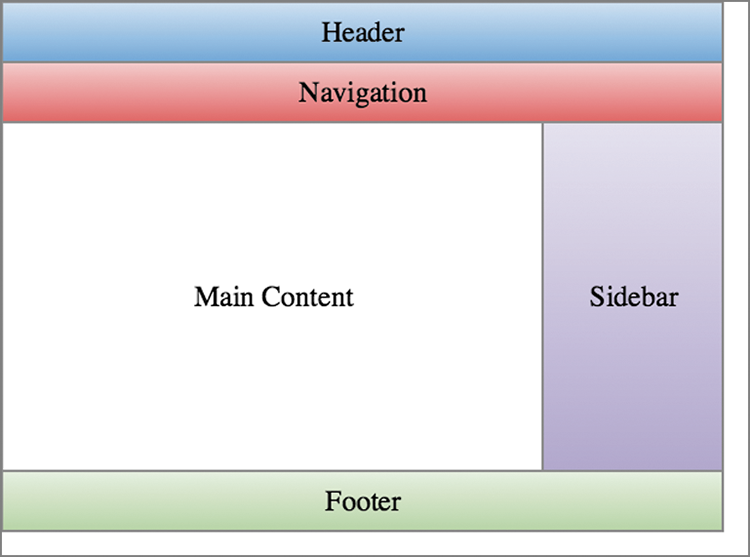
Use this schematic to see the header, navigation, columns, and footer as one page structure before considering CSS rules. section 11.1
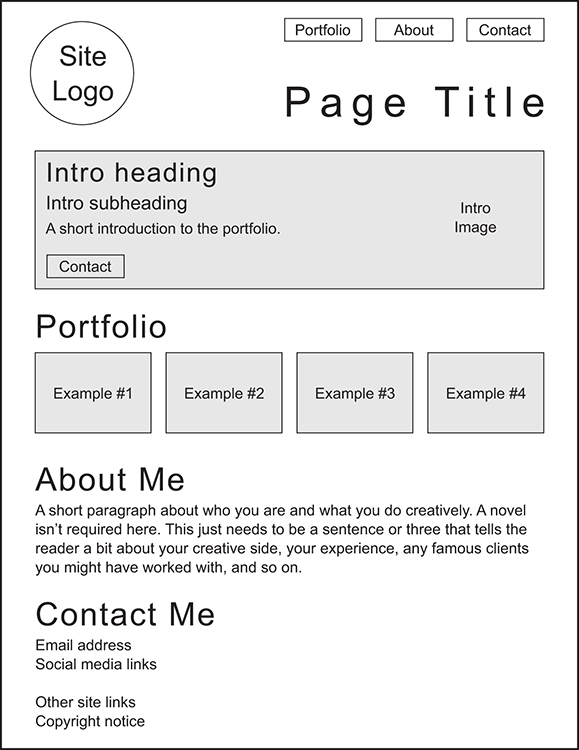
Use this portfolio sketch as a planning model: one large introduction area followed by four smaller portfolio-image boxes. section 20.2






