Page layout is the overall structure and organization of a web page: the arrangement of sections that helps visitors understand what the page offers and find information quickly. Plan the structure before writing HTML and CSS; a quick sketch is enough to reveal the page’s main regions, approximate sizes, and content. section 11.0 section 5.2
A practical layout workflow looks like this:
- Sketch the main sections with a pen or pencil instead of trying to hold the whole design in your head. section 5.2
- Label each section with a short description of its content, such as an introduction, navigation, portfolio, sidebar, or footer. section 15.3
- Choose the page’s typeface or typefaces after establishing its structure. section 5.2
- Translate the sketch into HTML and CSS, using layout methods rather than relying on repeated padding, margin, and floating adjustments. section 10.6
The holy grail layout
A content-focused page can use a header at the top, a navigation bar beneath it, two full-height columns for main content and related content, and a footer at the bottom. Variations may add a third column or keep the footer at the bottom of the browser window when content is short. section 11.1
Figure 11.1 A version of the holy grail web page layout
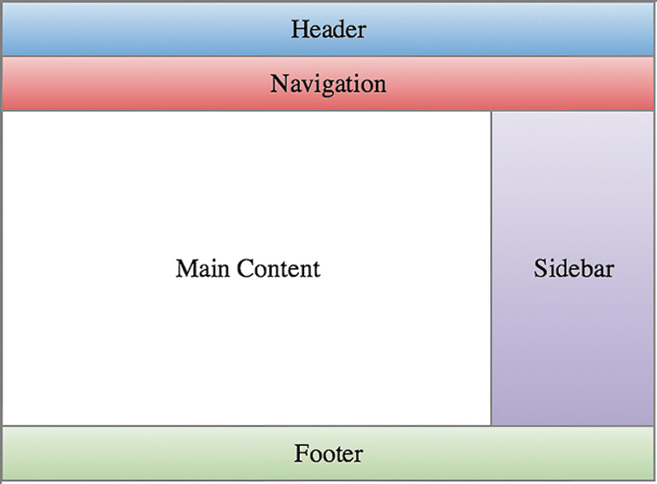
Use the schematic to see how the header, navigation, columns, and footer fit together as one page structure. section 11.1
The same planning habit scales across page types: a home page may combine an introduction, social links, biography, interests, and contact details; a gallery may organize a logo, navigation, image thumbnails, and footer; a portfolio may use one introductory box followed by four work samples. section 5.2 section 15.3 section 20.2






