A link-state update (LSU) message is an OSPF protocol message that carries one or more link-state advertisements (LSAs). During the Loading state, routers use LSUs to share requested routing information and LSAck messages to acknowledge receipt. section 18.3.1
LSUs can carry several important LSA types:
- Type 1 Router LSAs describe a router’s links. section 18.4
- Type 2 Network LSAs list routers on a broadcast segment and are generated by its designated router. section 18.4
- Type 5 AS External LSAs advertise routes to external networks, such as a default route to the internet. section 18.4
Checking the shared LSDB
Run `show ip ospf database` to view the LSDB. Routers should contain the same LSAs after synchronization; the example shows Type 1, Type 2, and Type 5 entries. section 18.4
Figure 18.9 The OSPF neighbor states: Down, Init, 2-Way, ExStart, Exchange, Loading, and Full. Routers that reach the 2-Way state are OSPF neighbors. Some routers remain in this state, and some proceed to establish a full adjacency.
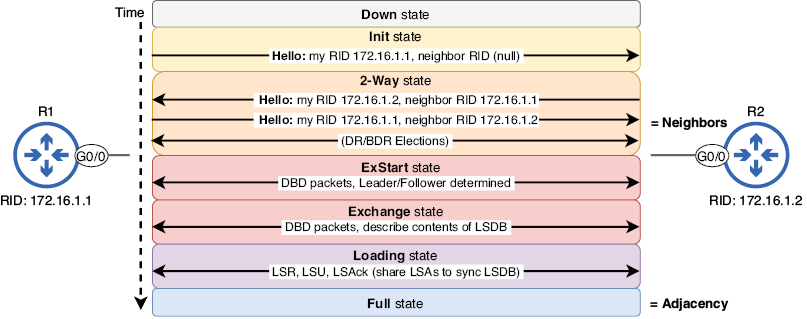
Follow the OSPF neighbor-state progression from Exchange through Loading to Full, where LSDBs are synchronized. section 18.3.1
