A fraud investigation may involve users, accounts, devices, cards, phones, and IP addresses linked through transactions or shared attributes. The Louvain algorithm partitions this graph into communities: groups more densely connected internally than to the rest of the network. A community may reveal coordinated activity, but membership alone does not establish fraud. section 9.3.3 section 9.6
A practical investigation moves from partitioning to inspecting the groups:
- Construct a graph whose nodes represent entities and whose edges represent relevant interactions or shared attributes. Choose the graph representation to suit the fraud pattern being investigated. section 9.6
- Run `community_louvain.best_partition(G, random_state=42, resolution=1.0)`, then attach the returned community IDs to nodes with `nx.set_node_attributes`. Check that the graph is nonempty and that a partition was produced. section 9.3.3
- Group nodes by community ID. For each group, inspect its subgraph, size, density, and counts of users, IPs, devices, phones, and cards. Density of 1 indicates a fully connected clique. section 9.3.3
- Review summaries and visualize a selected subgraph to examine relationships and bottlenecks, such as many users sharing one IP. Treat these patterns as leads for investigation. section 9.3.3 section 9.6
Listing 9.3 Applying Louvain community detection
# Ensure NetworkX (nx) is imported and G is the constructed graph from Listing 9.2
# Ensure pandas as pd and display from IPython.display are imported

if G is not None and G.number_of_nodes() > 0:
    print("\nPerforming Louvain community detection...")
    try:
        import community.community_louvain as community_louvain
        partition = community_louvain.best_partition(G, random_state=42, resolution=1.0)
        nx.set_node_attributes(G, partition, 'community_id')
        num_communities = len(set(partition.values()))
        print(f"Louvain algorithm detected {num_communities} communities.")

    except ImportError:
        print("Error: 'community_louvain' library not found. Please install it using 'pip install python-louvain'.")
        partition = None
    except Exception as e:
        print(f"An error occurred during community detection: {e}")
        partition = None
else:
    print("Graph G not available or empty. Skipping community detection.")
    partition = None # Ensure partition is defined
Python listing for obtaining a partition, assigning `community_id` attributes, and checking the detected community count. section 9.3.3
From community count to investigative leads
One run detected 2,913 communities. That count does not identify which groups deserve attention: a summary of the five largest communities compares their size, density, and entity-type counts, while a visualization of the largest uses distinct markers to expose relationships within it. section 9.3.3
Figure 9.4 A summary table of the top 5 largest communities detected by the Louvain algorithm, showing their size, density, and the count of different entity types within each
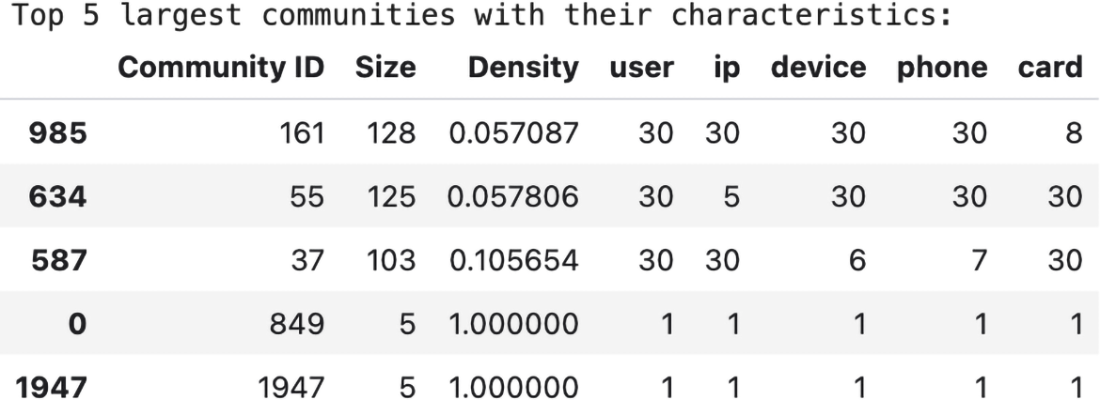
Compare size, density, and entity composition in the five largest detected communities rather than relying on the total count. section 9.3.3