Low-rank adaptation, usually called LoRA, is a small add-on model that gives a diffusion model a new style or concept without rebuilding the whole beast. Instead of fine-tuning every weight in a huge Flux or Stable Diffusion model, a LoRA modifies attention layers: a small but influential part of the network. The result can be a dramatic behavior change from a file often under 100 MB. section 11.0 section 11.2
That small footprint matters because full checkpoint fine-tuning demands far more VRAM. LoRAs make custom Flux results trainable on home GPU hardware, although training a Flux LoRA can still require 24 GB of VRAM. Use one when a base model produces polished-but-sterile images, ignores style requests, or needs to recognize a particular subject consistently. section 11.1 section 11.3 section 13.0
To use a LoRA in a ComfyUI image workflow:
- Download the LoRA into the expected directory and add a Load LoRA node. section 11.4.1
- Place it after the diffusion model and CLIP loader, connecting its model and CLIP outputs onward to the sampling and text-encoding nodes. section 11.4.1
- Run the same prompt first; the LoRA can change the image style without requiring other workflow changes. section 11.4.1
- Include its trigger words when required, then adjust strength_model to control its influence. Lower strength stays closer to the base output; excessive strength can damage image quality. section 11.4.2 section 11.8
- Combine LoRAs cautiously: their order affects the result. section 11.8
Figure 11.5 Visualizing how to connect the LoRA to the rest of the workflow.

Trace the two LoRA connections before running the workflow: it sits between loaded model components and their downstream nodes. section 11.4.1
From sterile render to amateur photo
A Flux prompt depicting an old man and a gate produces an impressive but plastic-looking first pass. Adding an Amateur Photography LoRA through Load LoRA changes the result into something that resembles a real snapshot, showing why style LoRAs are more effective than merely asking Flux for a style it tends to ignore. section 11.3 section 11.4.1
You can also train a concept LoRA for a subject. Start with 10–30 good, varied images; vary angles, poses, distances, and surroundings so the subject does not become confused with a couch, harness, or other repeated prop. In AI-Toolkit, create a job, name it, set a trigger word, select Flux.1, save intermediate checkpoints, and supply sample prompts. section 13.2.1 section 13.3
Do not blindly grab the final checkpoint. Compare generated samples across saved steps using both subject prompts and unrelated prompts. Pick a version that captures the subject even in stylized scenes without corrupting unrelated images; more training can also make similar subjects drift toward the trained one. section 13.5 section 13.5.1 section 13.5.3 section 13.5.4
Figure 13.19 After training is done, we can see the transformation of the generated images.
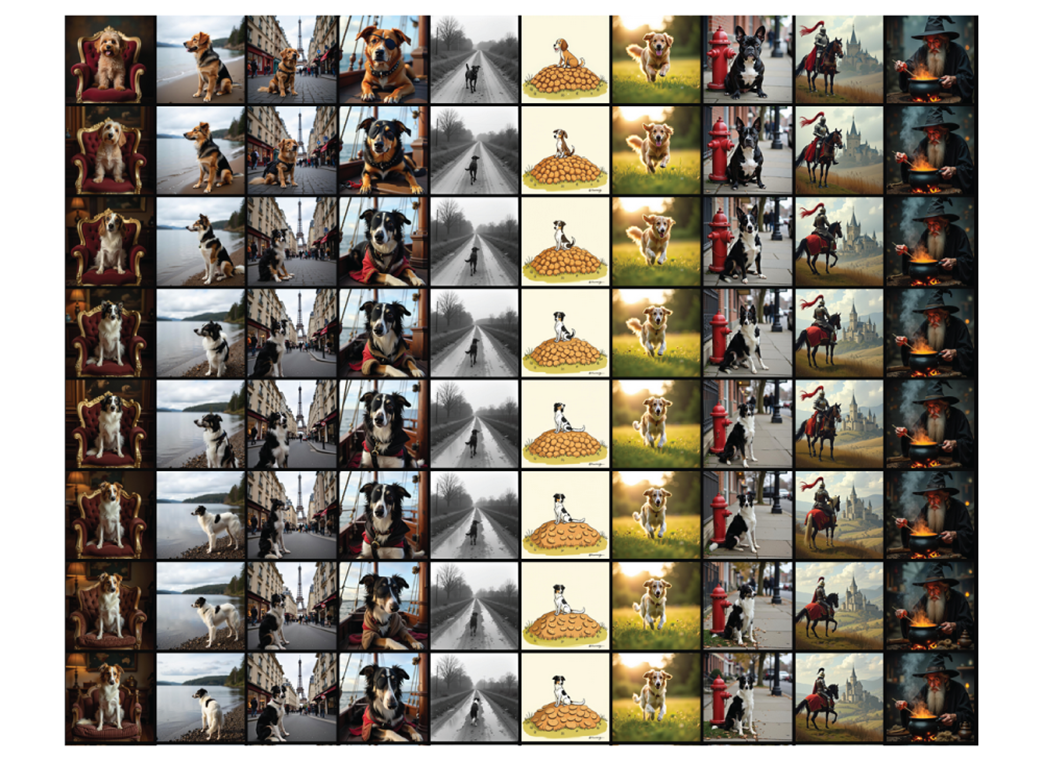
Compare sample images over training steps to judge subject learning, unwanted side effects, and the best checkpoint. section 13.5