A MAC address is a 48-bit Layer 2 address assigned to a device port, usually by its manufacturer. Ethernet and Wi-Fi use it for local, hop-to-hop delivery. MAC addresses are normally written as 12 hexadecimal characters. section 4.3.1 section 6.2.2
A frame carries a source MAC address and a destination MAC address. A switch examines the destination address to forward the frame within a LAN, while learning source addresses and their connected ports. Unlike the destination IP address, the destination MAC address changes at each routed hop. section 4.4 section 6.0 section 6.2.2
Keep these distinctions in mind:
- Use MAC addresses for the next hop; use IP addresses for the final destination. section 4.3.1
- Treat a frame as the Layer 2 protocol data unit containing a header, payload, and trailer. section 4.3.2
- Expect switches to forward known unicast frames and flood broadcasts or unknown unicasts. section 10.1.1
Sending traffic to another LAN
PC1 wants to ping PC3 on a different network. PC1 does not need PC3’s MAC address; it uses ARP to learn the default gateway R1’s MAC address, then sends a frame addressed to R1. SW1 learns the source MAC addresses and forwards or floods frames as appropriate. section 10.1.1
Figure 4.2 TCP/IP Layer 2. A message sent from PC1 to SRV1 takes three hops through the network: from PC1 to R1, from R1 to R2, and from R2 to SRV1. At each hop, the message is addressed to the next hop’s MAC address. A message traveling through a switch does not count as a hop.
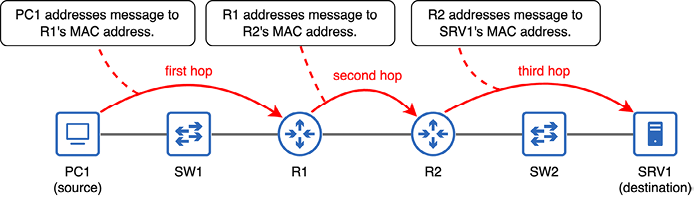
Trace three routed hops from PC1 to SRV1 and observe how each hop uses the next device’s MAC address; traffic through a switch does not count as a hop. section 4.3.1

