liveBook · Manning

Matplotlib

As explained in Pandas Workout: 200 exercises to make you a stronger data analyst

Matplotlib is a Python library for creating static, animated, and interactive data visualizations.

Matplotlib is a Python library for creating static, animated, and interactive visualizations. It provides powerful plotting capabilities, while pandas offers a simpler plotting API that uses Matplotlib underneath. section 11.0

A practical Matplotlib-based workflow typically involves:

  • Preparing the data by filtering rows, selecting columns, changing indexes, cleaning strings, and converting values to numeric types. section 11.2
  • Choosing a plot that matches the question, such as bar, pie, scatter, or line plots. section 11.2
  • Sorting values before plotting when the visual comparison depends on order. section 11.2
  • Adjusting presentation with options such as figsize when many categories make the default chart difficult to read. section 11.2

Counting cities by state

Group the city data by state, count the city values, sort the resulting Series, and plot it as a bar chart: df.groupby('state')['city'].count().sort_values().plot.bar(figsize=(10,10)). section 11.2
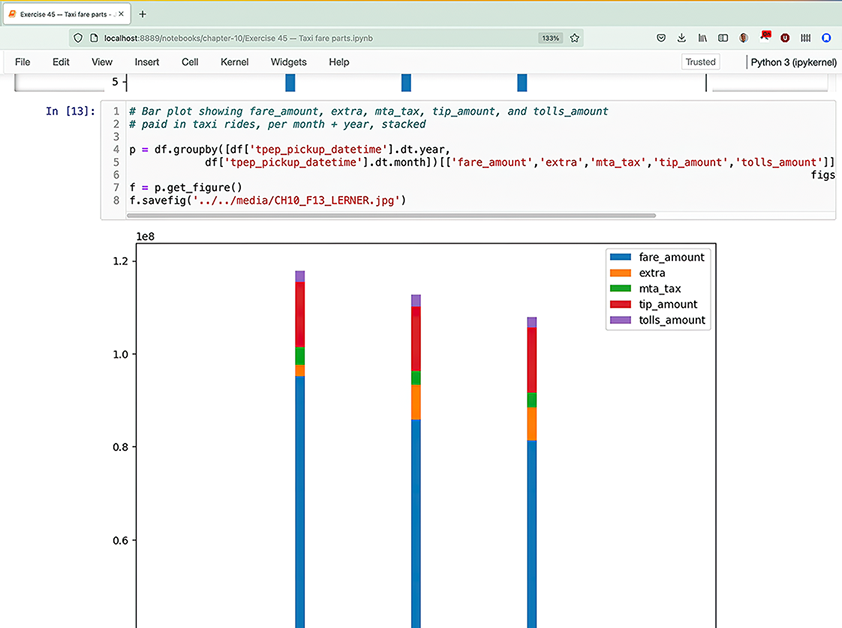
Figure 11.1 Screenshot of a Jupyter notebook combining code and plots

A Jupyter notebook can keep code, data, and Matplotlib-generated plots together inline, supporting experimentation and sharing. section 11.0


How Pandas Workout: 200 exercises to make you a stronger data analyst covers it

How deep it goes
Demonstrates plot selection, data preparation, sorting, sizing, and pandas integration, but defers most direct Matplotlib API configuration.
Examples
Uses city counts, Pennsylvania growth, Massachusetts populations, geographic coordinates, and weather relationships to demonstrate chart types.
What it assumes
Assumes working knowledge of pandas data frames, grouping, filtering, indexes, and basic numerical data preparation.
What you can do after
Builds exploratory charts through pandas plotting methods backed by Matplotlib and compares them with Seaborn alternatives.
How it connects
Connects data visualization with pandas, Jupyter, Seaborn, grouping, filtering, sorting, and exploratory data analysis.

Also explained in

Compare how 4 books explain Matplotlib →

Related concepts

This explainer was generated by Manning's knowledge graph from the text of Pandas Workout: 200 exercises to make you a stronger data analyst. The section links point to the parts of the book it draws on.

