When Airflow uses the CeleryExecutor to run tasks across multiple machines, its scheduler needs a queue through which workers can receive tasks. Celery calls this queue a broker. The scheduler sends messages to it, and Celery workers wait for tasks to arrive. section 15.2.3
Figure 15.3 In the CeleryExecutor, tasks are divided among multiple machines running Celery workers. The workers wait for tasks to arrive in a queue.
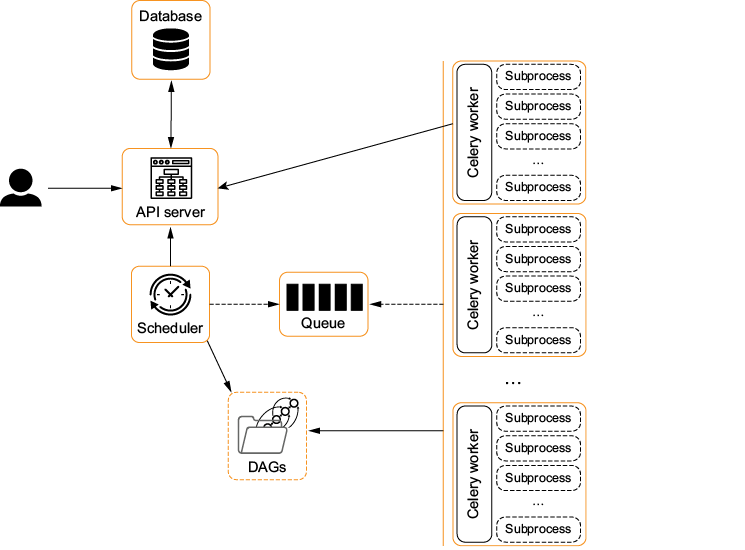
The diagram shows tasks distributed among machines running Celery workers, with workers waiting on a queue. section 15.2.3
To connect Airflow to a broker:
- Install the Celery dependencies and select the executor: `pip install 'apache-airflow[celery]'` and `AIRFLOW__CORE__EXECUTOR=CeleryExecutor`. section 15.2.3
- Install a Celery-supported queueing system, then set `AIRFLOW__CELERY__BROKER_URL` to its URI. Redis, RabbitMQ, and AWS SQS are supported options in this setup. section 15.2.3
- Configure `AIRFLOW__CELERY__RESULT_BACKEND` separately so workers can communicate with the Airflow metastore. Make the DAGs folder available to workers at the path set by `AIRFLOW__CORE__DAGS_FOLDER`. section 15.2.3
Redis broker
Set `AIRFLOW__CELERY__BROKER_URL=redis://localhost:6379/0`. After starting the Airflow API server, scheduler, and a worker with `airflow celery worker`, trigger a DAG manually. A successfully completed task validates the path through the CeleryExecutor components. The Redis URI is a broker address, not a substitute for the separately configured result backend. section 15.2.3
A queue can also carry external events: a message published on a message bus may be a reason to trigger a DAG. That use is distinct from the CeleryExecutor broker’s role in distributing Airflow tasks to workers. section 7.0 section 15.2.3


