Middleware is a small C# component that handles an HTTP request or response. In an ASP.NET Core application, components form a pipeline: a request moves through them in order, and the response travels back through them in reverse order. This lets each component take care of one job, such as logging, serving a file, or handling an error. section 4.1 section 4.2
Figure 4.1 Example of a middleware pipeline. Each middleware component handles the request and passes it on to the next middleware component in the pipeline. After a middleware component generates a response, it passes the response back through the pipeline. When it reaches the ASP.NET Core web server, the response is sent to the user’s browser.
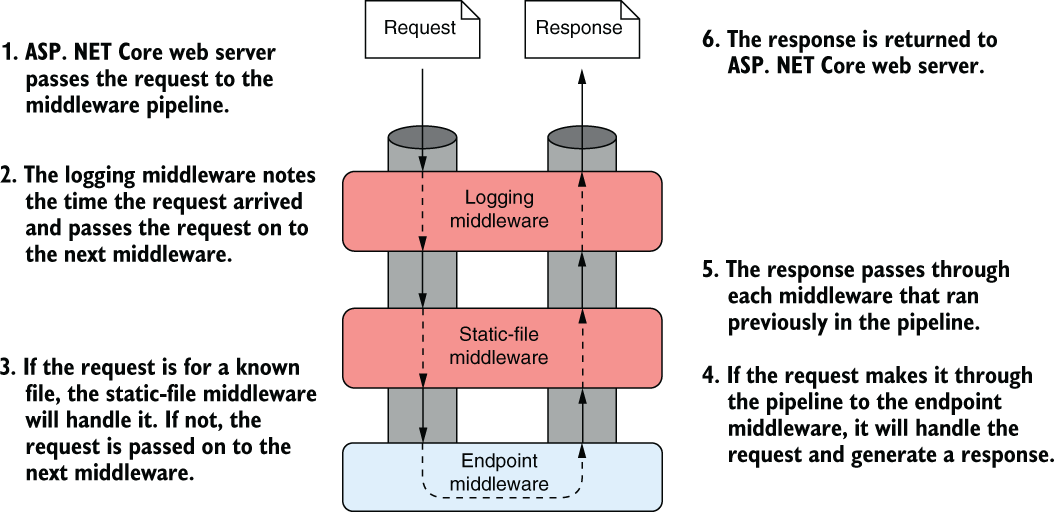
Follow the request inward and the response outward. A component can act at either point. section 4.1
The web server creates an HttpContext for each request and passes it into the pipeline. Middleware can change that context for later components, pass the request along unchanged, or generate a response itself. If it responds without calling the next component, it short-circuits the pipeline: later middleware and endpoints do not run for that request. If nothing handles a request, the pipeline returns a 404 status code. section 3.1 section 4.4
Start with a holding page
Create a WebApplication, call app.UseWelcomePage(), then app.Run(). The welcome-page middleware responds with the same sample HTML page at every path. It is a quick way to check that the application is receiving requests, not a customizable production page. section 4.2.1
Add middleware to WebApplication with Use* methods in Program.cs. Registration order matters: a component can use data established by earlier middleware, but not data established by later middleware. Place error handling before components whose errors it should catch. A component that handles a request early can prevent everything after it from running. section 3.7.2 section 4.2.3 section 13.1.2
Add request logging
Register HTTP logging services on WebApplicationBuilder, build the app, then call app.UseHttpLogging() when app.Environment.IsDevelopment(). MapGet("/person", ...) defines an endpoint that returns JSON; it does not add middleware. In development, a request to /person produces the JSON response and logs request details to the console. section 3.7 section 4.2.3
RoutingMiddleware selects an endpoint; EndpointMiddleware executes it. Other middleware can serve static files before routing or check authorization after routing has identified the endpoint. For behavior needed across requests, middleware is generally a good fit. When behavior needs an endpoint’s return value or MVC-specific information, consider an endpoint or MVC filter instead. section 14.1 section 5.4.2 section 21.3









