Middleware is code in Django’s request-processing path between URL routing and a view. It can change what reaches the view, run work before or after it, or stop the view from running. That makes it a useful home for behavior that applies across many requests rather than a snippet copied into every view. section 6.1 section 14.1
Middleware commonly supports site-wide concerns:
- Authentication and session management, including determining whether someone is logged in and expiring a session automatically. section 6.1
- Authorization checks at the view level can build on authentication; for example, a protected page can use @login_required and then verify band membership. section 6.1
- Development tooling such as Django Debug Toolbar, whose middleware gathers information while pages are processed. section 13.1
Figure 6.1 Session management and login control through middleware
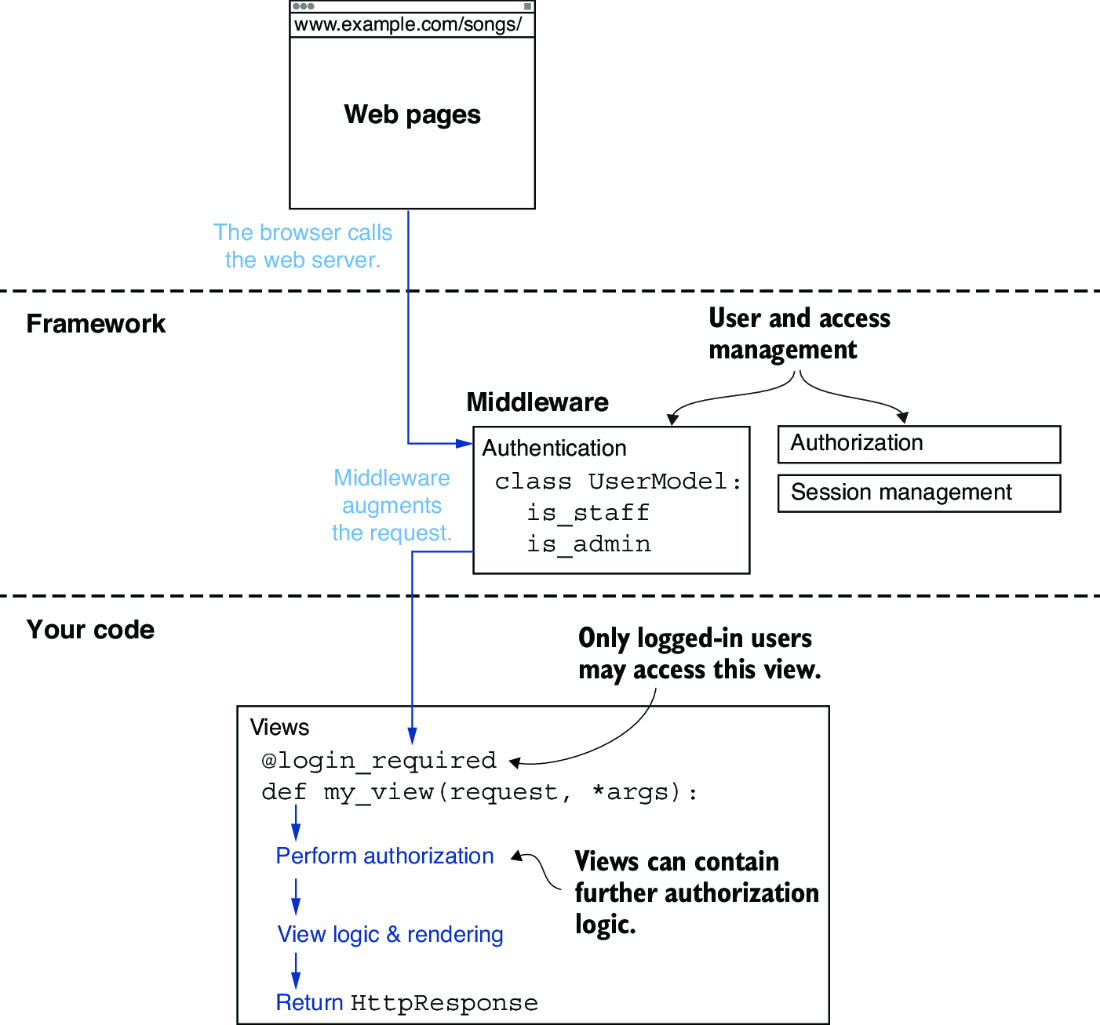
Use the request-flow diagram to place session and login control between routing and the protected view. section 6.1
Adding Django Debug Toolbar middleware
Install django-debug-toolbar, register debug_toolbar in INSTALLED_APPS, and add debug_toolbar.middleware.DebugToolbarMiddleware to MIDDLEWARE. Placement matters: put it as high as possible, but after encoding middleware such as GZipMiddleware. Add the toolbar routes, restrict it to the local environment, and include 127.0.0.1 in INTERNAL_IPS. A working toolbar appears as a page callout with panels for request, SQL, templates, timing, and more. section 13.1
Middleware is pluggable. If the same code keeps appearing across views, it may belong in middleware instead. Custom middleware can use a factory function or a class, though its implementation is left to Django’s documentation. section 14.1









