A musical note is a timed sound placed on a pitch row. Notes form patterns on individual NES APU channels; an instrument plays each note, shaping its sound with properties such as pitch, volume, and arpeggio envelopes. section 15.1 section 15.1.2
In a piano roll, place a note on the row matching its piano key, then drag to set its duration. Thin grid lines mark display frames, while thicker lines mark beats. Drag an existing note to change its pitch, start, or end; a release point can let it fade rather than stop abruptly. section 15.1.2
Notes can be used to build both music and short game sounds:
- Sequence notes in a pattern to create a musical part on one channel. section 15.1 section 15.6
- Use a slide note to move from a starting pitch to a target pitch over time. section 15.1.2
- Alternate short noise notes at different pitches for an explosion-like effect. section 14.2.2
Laser zap note
Create one E5 note, then turn it into a slide note and move its target down to F3. The falling pitch produces a zap-like sound rather than a flat tone. Timing settings determine how many display frames each note occupies. section 14.2.1
Figure 15.3 The notes using the Square 1 channel for the Tetris song
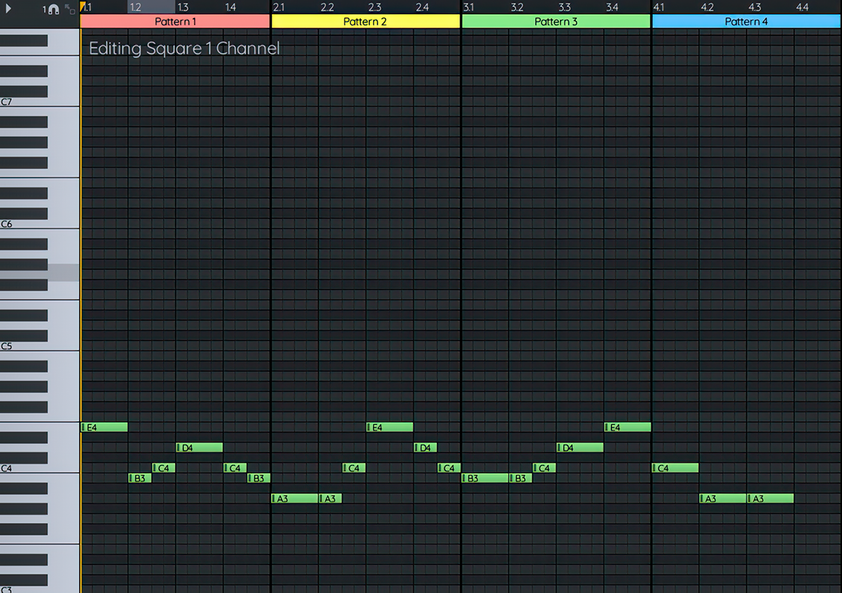
This piano-roll view shows notes arranged by pitch and time on the Square 1 channel, making their pattern layout visible. section 15.1.2


