A next hop is the adjacent router or forwarding address used to move a packet toward a remote destination network. The router selects a matching route, then sends the packet in a frame addressed to the next hop’s MAC address. section 9.3 section 10.3
Figure 9.7 PC1 sends a packet to PC3 via R1, R2, and R3. (1) PC1 sends the packet in a frame to R1 G0/1. R1 receives it and performs a routing table lookup. (2) R1 forwards the packet in a frame to R2 G0/0. R2 receives it and performs a routing table lookup. (3) R2 forwards the packet in a frame to R3 G0/0’s MAC. R3 receives the packet and performs a routing table lookup. (4) R3 forwards the packet in a frame to PC3, which receives and processes it.
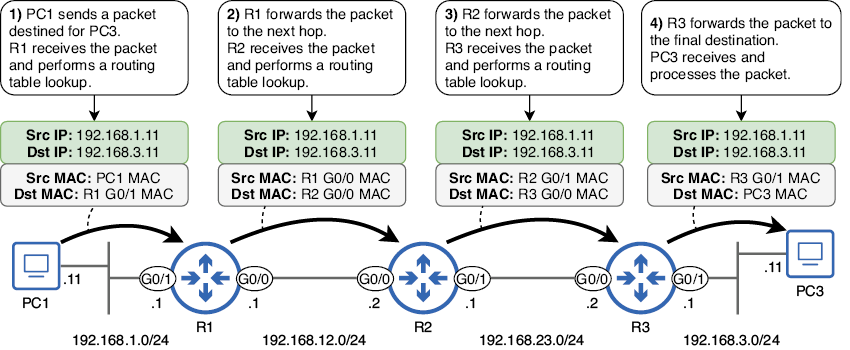
Follow PC1’s packet through R1, R2, and R3 to see how each router forwards it to the next hop. section 9.3
For a packet destined for 192.168.3.11, R1 can use a static route to 192.168.3.0/24 via 192.168.12.2, R2’s address. R1 need not know the remainder of the path; R2 performs the next lookup. section 9.3 section 10.1.2
Configuring a next-hop static route
On Cisco IOS, configure `ip route 192.168.3.0 255.255.255.0 192.168.12.2`. This recursive static route first looks up the destination route, then looks up the next-hop address to find the exit interface. ARP then resolves 192.168.12.2 to R2’s MAC address. section 9.3.1 section 10.1.2
Related forwarding and configuration points:
- A router uses the most specific matching route; without a matching route, it drops the packet. section 9.4
- A static route may specify only a next-hop IP address, only an exit interface, or both. section 9.3.1
- Two-way communication requires routes toward both hosts’ networks, not necessarily routes to every intermediate network. section 9.3
