Node degree counts the edges incident to a node, or equivalently its adjacent nodes under the graph’s conventions. It provides a quick measure of local connectivity: low-degree nodes are sparsely connected, while high-degree nodes can dominate unnormalized neighborhood aggregation. section 8.3 section 3.4.3
Use degree statistics as a compact graph-exploration and preprocessing workflow:
- Count edges or adjacent nodes for every node from an adjacency matrix, adjacency list, or graph object. section 5.2.1 section 8.3
- Plot a degree histogram to see common connectivity levels, peaks, tails, and unusually prominent nodes. section 5.2.1 section 8.3.3
- Sort degrees into a rank plot to inspect how quickly connectivity falls from the most connected nodes. section 8.3.3
- Account for disconnected components before interpreting degree statistics or selecting a graph subproblem. section 8.3.3
Amazon Electronics and social graphs
The Amazon co-purchaser graph contains 7,650 nodes and more than 143,000 edges, yet remains very sparse. Most nodes have degree below 10, a second peak appears around 30, and only a few nodes have very high degree. A social-graph workflow uses NetworkX’s degree method, then plots sorted degrees and a histogram; roughly three-fourths of nodes have fewer than 20 adjacent nodes. section 5.2.1 section 8.3.3
Figure 8.13 Visualization and statistics of the social graph and its large connected component. Network visualization using NetworkX default settings (top). A rank plot of node degree of the entire graph (bottom left). We see that about three-fourths of nodes have less than 20 adjacent nodes. A histogram of degree (bottom right).
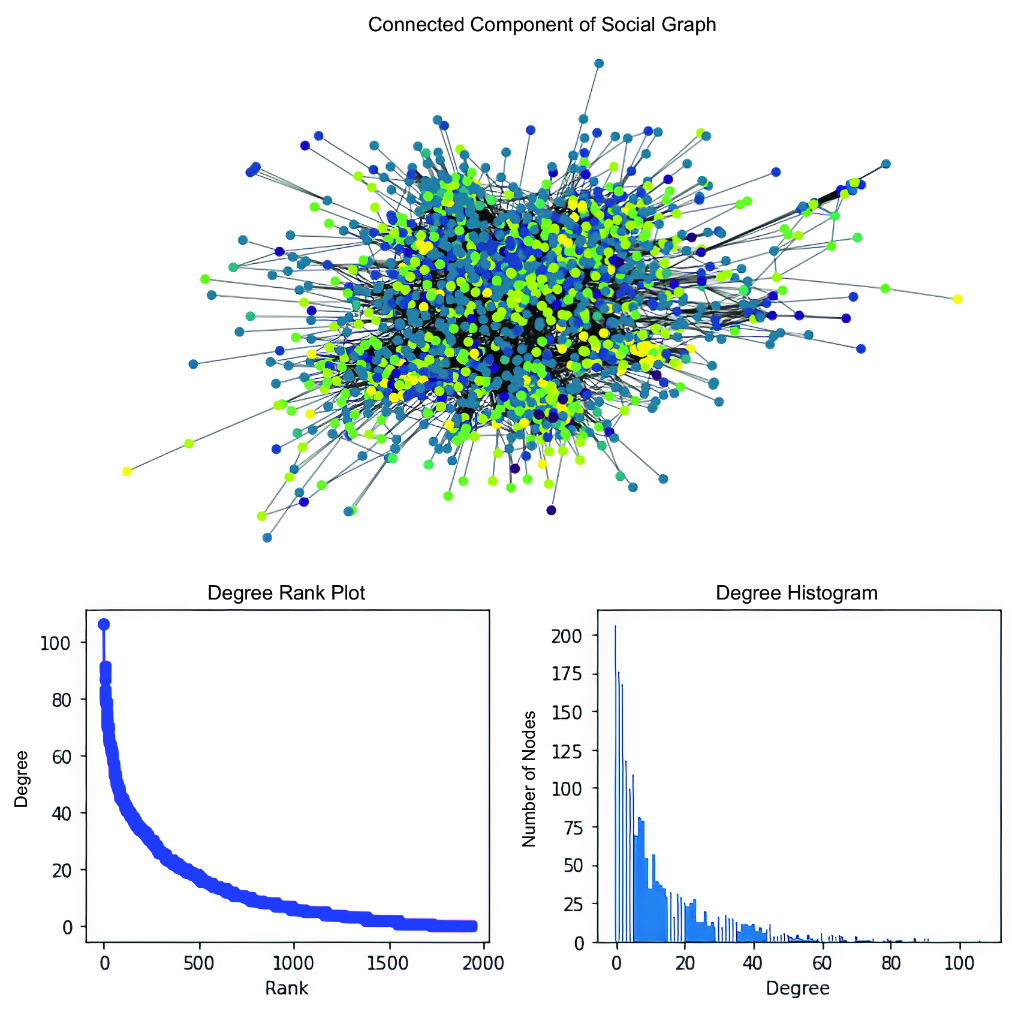
Compare a degree-rank plot with a degree histogram to see both prominent nodes and the overall connectivity distribution. section 8.3.3



