An object store keeps data as objects rather than files in a hierarchy of folders. Each object contains its data, metadata, and a unique identifier called a key. Metadata can describe its size, content type, owner, or last modification date; you can request metadata without downloading the data. section 7.1
Figure 7.1 Objects stored in an object store have three parts: a unique ID, metadata describing the content, and the content itself (such as an image).
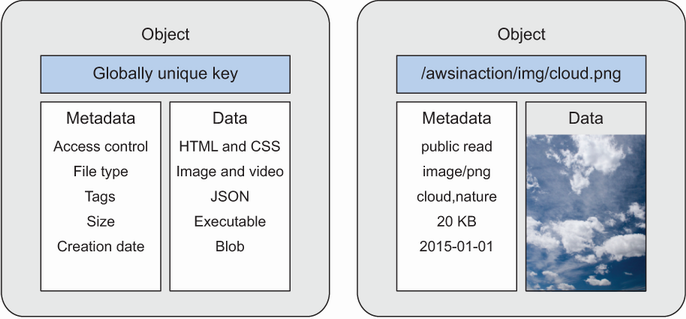
See how an object's key, metadata, and content fit together. section 7.1
Amazon S3 is a managed, distributed object store. It groups objects in buckets, whose names must be globally unique. Applications upload and retrieve objects through an HTTPS API using the AWS CLI, an SDK, or the Management Console. S3 supports virtually unlimited total storage, but an individual object cannot exceed 5 TB. section 7.2 section 7.0
Store a static website
Create a bucket with `aws s3 mb s3://$BucketName`, then upload a page with `aws s3 cp $pathToPlaceholder/helloworld.html s3://$BucketName/helloworld.html`. To serve it as a website, configure public read access with a bucket policy and set the index document using `aws s3 website s3://$BucketName --index-document helloworld.html`. S3 serves static files, not server-side scripts such as PHP. Public access needs deliberate care: Block Public Access helps prevent sensitive-data leaks, but enabling it for the account breaks public website hosting. section 7.6.1 section 7.6.2 section 7.6 section 7.7
For application uploads, an AWS SDK can put an image in a bucket, list object keys, and use those keys to retrieve images. Keeping uploads in S3 rather than on an application server supports a stateless server. An object creation or modification can also trigger an AWS Lambda function—for example, to process access logs and send their data to Elasticsearch. section 7.5.3 section 7.9 section 6.4.4
S3 can hold backups, archives, static content, and user-generated files. Its pay-per-use model charges for stored data, requests, and transferred data, so storage design includes both access control and cost decisions. section 7.0 section 7.2




