liveBook · Manning

Object store

As explained in LLMs in Production

An object storage system stores data as independently addressable objects distributed across storage infrastructure.

An object store breaks large assets into independently managed objects distributed across machines and physical memory locations. This makes systems such as GCS and S3 inexpensive, highly available, and resilient through replication, but retrieval can be slow for large assets. section 6.1.2

Loading an LLM

A compiled LLM can live in a cloud-storage bucket or artifact registry. Loading it into GPU memory usually requires downloading the model first because its objects are distributed rather than arranged for direct in-memory access. section 6.1.2

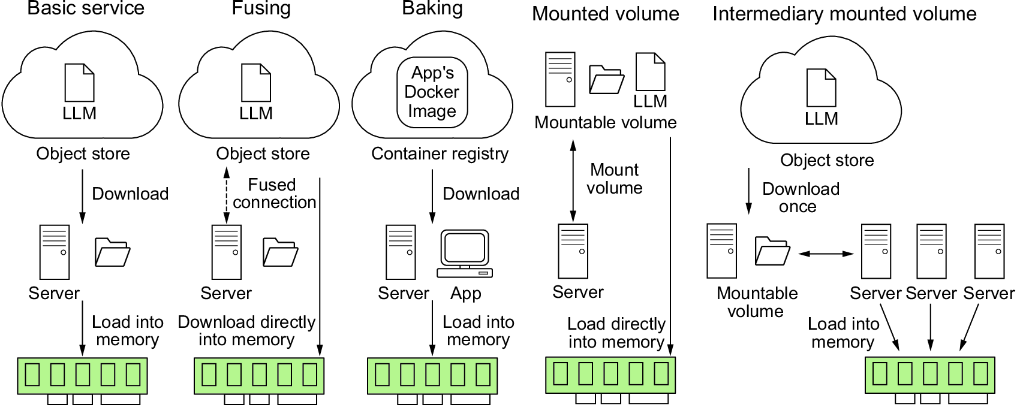
Figure 6.3 Different strategies for storing LLMs and their implications at boot time. Often, we have to balance system reliability, complexity, and application load time.
figure

Compare storage strategies by balancing reliability, implementation complexity, and application load time. section 6.1.2


How LLMs in Production covers it

How deep it goes
Explains fragmentation, federation, replication, availability, and retrieval costs, then stops short of detailed storage implementation.
Examples
Uses GCS, S3, cloud buckets, compiled LLMs, and fused buckets as concrete storage and retrieval examples.
What you can do after
Evaluate storage choices for large model assets while accounting for reliability, retrieval speed, and boot-time loading.
How it connects
Connects object stores with artifact registries, cloud storage, filesystem mounting, GPU memory, and LLM boot times.

Also explained in

Compare how 5 books explain object store →

Related concepts

This explainer was generated by Manning's knowledge graph from the text of LLMs in Production. The section links point to the parts of the book it draws on.


