Ollama lets you download, manage, run, and serve large language models (LLMs) on your own computer. Think of Ollama as a music player and a model as the music file: Ollama is not the AI itself, but it makes the model usable. Once a model is downloaded, you can ask it questions locally without sending the conversation to a cloud service. section 3.1 section 3.6
Ollama can accept a question typed in the terminal or sent by a Python script through its API (a way for code to request a response). Its server loads the model from disk into memory, processes the input on your Mac, and returns an answer. This makes it the language-model part of a private assistant alongside speech recognition and a web interface. section 3.1.2 section 1.0
Figure 3.1 Ollama’s architecture on your Mac. When you send a prompt (step 1), Ollama loads the model from disk (step 3), processes the input using the Mac’s hardware components (step 4), and generates a response (step 6). All the processing happens inside the “Your Mac” boundary; nothing is sent over the internet.
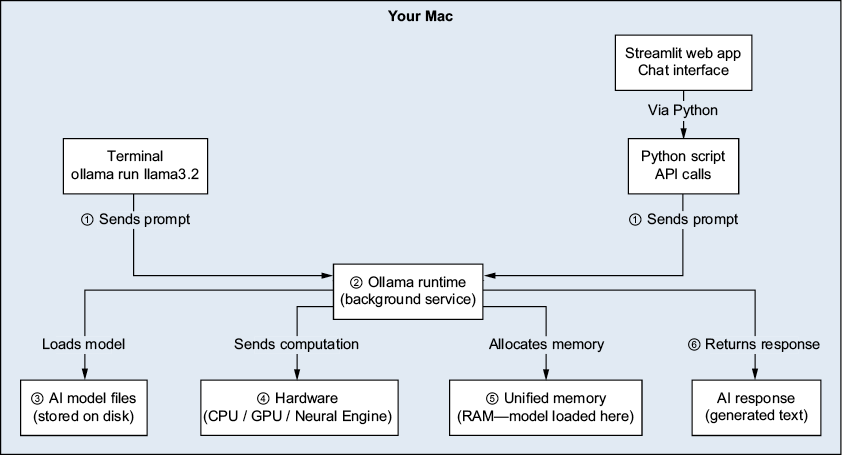
Follow the prompt from the terminal or Python script through Ollama to the model and back. The diagram’s “Your Mac” boundary shows where processing happens. section 3.1.2
A practical macOS setup follows this sequence:
- Install Ollama with Homebrew: `brew install ollama`. A macOS desktop app is another option. section 3.3.2
- Start its server with `ollama serve`. It listens at `http://localhost:11434`; keep that terminal window open and use another for commands. section 3.6
- Download a model with `ollama pull`, then start one with `ollama run`, supplying the model you choose. Ollama can manage and switch between multiple models. section 3.1.1
When Python cannot connect
A “connection refused” error at `localhost:11434` usually means the Ollama server is not running. Start `ollama serve`, then try `curl http://localhost:11434`; a running service should reply “Ollama is running.” If the terminal running the server was closed, or your Mac restarted, launch it again. If you also installed the desktop app, check which method you are using to start Ollama. section 15.1.2
Local operation keeps conversations on your machine, while cloud AI sends data over the internet. The tradeoff is that local models differ in size and recency. Ollama is designed for Apple Silicon Macs and provides API access when you are ready to connect a Python application. section 3.6 section 3.1.1







